
When evaluating government intranet software, public sector IT and communications leaders often hear the same frustrating trade-off: if your data has to stay inside your own Microsoft 365 boundary, your SharePoint intranet has to stay plain, rigid, and often outdated.
Agency teams frequently feel stuck between two bad choices. Leave SharePoint completely out-of-the-box and watch staff struggle with buried documents and clunky navigation, or deploy an external SaaS intranet overlay that introduces third-party cloud hosting, long security reviews, and compliance headaches.
You do not have to sacrifice usability to maintain strict data sovereignty. By pairing native SharePoint Online with pre-built, 100% in-tenant SharePoint Framework (SPFx) components, such as those offered by Origami Connect, municipalities, and regulated organizations can deliver an intuitive government intranet portal where zero data ever leaves their Microsoft 365 tenant.
Key Challenges When Building a SharePoint Intranet for Government
Designing a government SharePoint intranet is fundamentally different from launching an internal site for a commercial customer.
Public sector and compliance-heavy organizations must navigate strict operational and technical realities:
Strict Cloud Boundaries, Data Residency, and Sovereignty: Whether you manage a U.S. Microsoft 365 Government (GCC and GCC High) tenant with PIV/CAC smart card mandates or a UK government intranet governed by UK GDPR and local data protection laws, agency information must remain inside an approved boundary. Traditional third-party SaaS intranet overlays often ingest, cache, or index search metadata on external vendor servers, creating cross-boundary data hops, triggering lengthy FedRAMP or Data Protection Impact Assessment (DPIA) queues, and introducing compliance risk.
Cross-Departmental Search Silos: Limited Microsoft Graph signals in restricted government tenants, combined with sprawling sub-sites, make it difficult for employees to locate critical SOPs, forms, and council documents quickly.
High-Stakes Policy Compliance and Version Control: Staff need immediate confidence that they are referencing the latest approved bylaw, emergency protocol, or HR policy, not an outdated file saved on a shared drive, while administrators need auditable proof of policy acknowledgments.
Long-Tenured Workforces and Rapidly Shifting Priorities: County and municipal workforces often include employees with 20- to 30-year tenures who rely on stability, clear communication, and institutional knowledge, alongside frontline teams responding to constantly evolving local ordinances, schedules, permits, and public works operations.
Tight Public Budgets and Maintenance Constraints: Building a custom SPFx intranet from scratch often takes 6 to 12 months, consumes substantial contractor budgets, and leaves internal IT teams with ongoing custom code maintenance. Meanwhile, per-user recurring SaaS subscriptions penalize agencies as headcount fluctuates.
What Makes an In-Tenant SPFx Architecture a Secure Intranet for Government?
Among the best intranet platforms for government and regulated sectors, the architecture that bypasses six-month compliance bottlenecks without sacrificing modern design is native in-tenant SPFx deployment.
Rather than operating as an external cloud service, an in-tenant solution like Origami Connect consists of compiled client-side .sppkg packages deployed directly into your organization’s own SharePoint App Catalog.
Why Zero Data Ever Leaves Your Tenant
100% Tenant Isolation: Every page, document library, policy acknowledgment log, and staff directory entry lives exclusively inside your own Microsoft 365 environment. There are no external vendor servers, no cloud overlays, and no cross-boundary API calls.
Purely Client-Side Execution: Web parts run directly inside the user’s authenticated browser session using native Microsoft 365 TLS encryption. No data is cached, stored, or indexed externally.
Zero Telemetry or Tracking: Unlike commercial SaaS platforms that ping external endpoints for analytics, Origami Connect transmits 0% telemetry, tracking cookies, or background usage data outside your tenant.
Native Security, Permissions, and Authentication: Because everything stays inside SharePoint, the intranet automatically inherits your existing Entra ID (Azure AD) security, Multi-Factor Authentication (MFA), PIV/CAC card tokens, Role-Based Access Control (RBAC), and SharePoint version history. Even vendor support has zero default access to your environment.
Built-In Regulatory Alignment (U.S., UK, UE, and Beyond): Because data never exits your Microsoft 365 perimeter, you inherit the compliance posture your organization has already established with Microsoft:
For UK Government and Public Sector Agencies: Your SharePoint tenant already handles UK GDPR, local data residency, and national data protection requirements through your existing Microsoft agreement and Microsoft Purview controls. Because no data is ever shared with or processed by a third-party SaaS provider, you do not have to vet external sub-processors, audit vendor cloud hosting locations, or navigate cross-border data transfer compliance checks.
For U.S. GCC, GCC High, and Healthcare Agencies: Your existing agency Microsoft 365 GCC Business Associate Agreement (BAA) and HIPAA 45 CFR § 164.312 technical safeguards remain intact without requiring separate vendor BAAs or external SaaS data-handling audits.
Zero Vendor Lock-In: If you ever uninstall the solution, your underlying SharePoint pages and content remain right where they are with zero data migration required.
Two Practical Local Government Intranet Layouts in Action
When your intranet for government keeps data locked safely inside Microsoft 365, your team can focus on what actually drives employee adoption: making everyday information effortless to find. Here is how two distinct local government intranet templates solve real operational needs.
1. The County Government Intranet: Built for Institutional Stability and Fast Navigation
County agencies often support thousands of long-serving employees across dozens of departments, making cultural connection and structured navigation top priorities.
Personalized Welcome & Cascading Mega Menu: Employees are greeted by name upon login alongside a clean, cascading mega menu across the top that organizes complex sub-sites into intuitive categories like New Employees, Payroll, Benefits, and Learning & Development.
Above-the-Fold Quick Access & Rolled-Up News: Essential links, such as pay schedules, county policies, and third-party county GIS mapping systems, sit immediately visible alongside targeted leadership and departmental news feeds.
Interactive Events Calendar & Highlighted Dates: Staff can filter upcoming events using a date-range picker while a dedicated spotlight card keeps major agency milestones front and center.
Searchable Policies & Forms Hub: Employees can search directly within a dedicated policies and forms finder or browse by category tiles (Expenses, Pay, Records Management, and HR Policies).
Filterable Employee Directory & Feedback Loop: When staff don't know a colleague's name, they can filter the directory by department or location to find direct contact details, and submit workplace suggestions through an embedded employee feedback form.
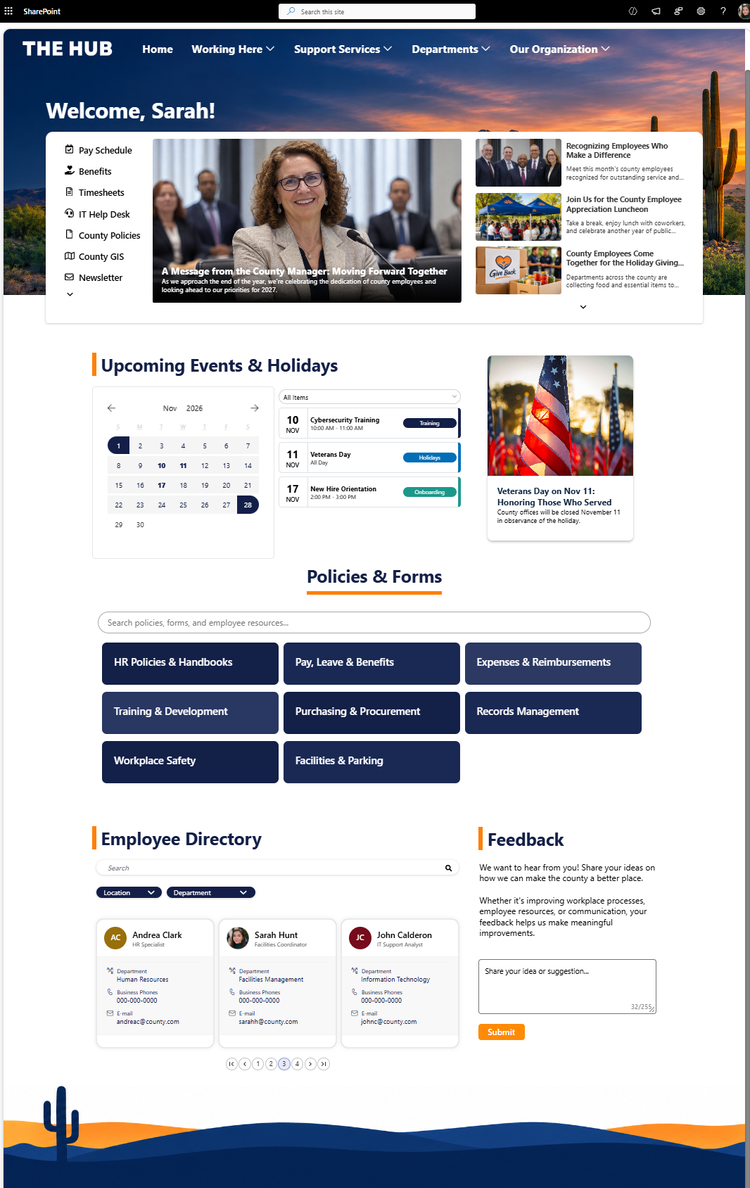
SharePoint Intranet Homepage for Local Government and Counties
2. The City & Municipality Intranet: Built for Fast-Moving Civic Operations
Municipalities operate at a rapid daily pace, coordinating sanitation schedules, building and other permits, fleet operations, and shifting local bylaws.
Front-and-Center Policy & Bylaw Search: A prominent search bar right in the header lets staff pull up active bylaws, construction or utility permit rules, and standard operating procedures in seconds.
High-Visibility Civic Shortcuts: Direct action tiles at the top of the homepage connect employees immediately to timesheets, IT help desk ticketing, interactive maps, and internal directories.
Categorized Announcements & Document Finder: A filterable news feed separates urgent leadership announcements from department milestones, paired with large visual tiles that drill straight into Council Reports, Fleet & Facilities, Hiring, and Staff Management documents.
Color-Coded Calendars & Peer Recognition: Alongside a filterable, color-coded events calendar, a dedicated Staff Shout-Outs feed lets colleagues publicly recognize teammates for hitting service anniversaries or going above and beyond, reinforcing morale across long-tenured civic teams.
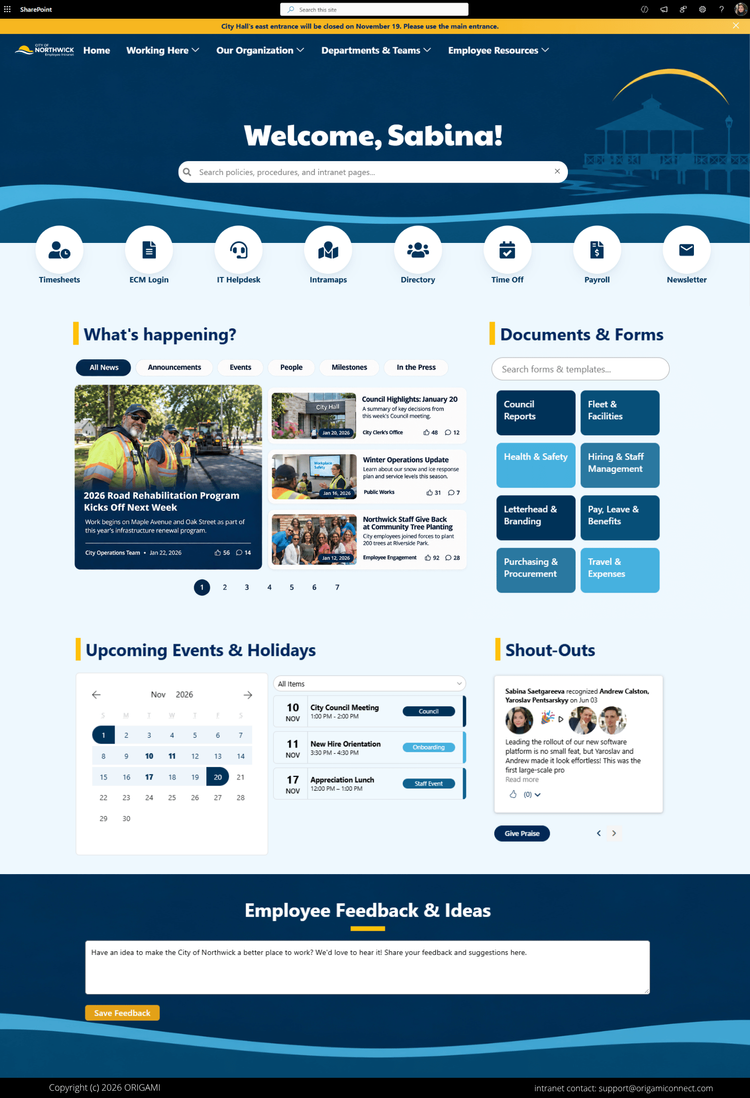
Frequently Asked Questions About Secure Government Intranets
What is the most secure intranet architecture for government agencies?
A secure government intranet built using 100% in-tenant SharePoint Framework (SPFx) components is the safest architectural model for public sector organizations. Unlike third-party SaaS overlays that host or index content on external servers, an in-tenant SPFx intranet runs purely inside your existing Microsoft 365 boundary, ensuring zero data leaves your tenant.
Does a SharePoint intranet for government support Microsoft 365 GCC and GCC High?
Yes. Pre-built SPFx web parts deployed directly into your agency’s SharePoint App Catalog work natively inside Microsoft 365 Commercial, GCC, and GCC High tenants. Because there are no external cloud dependencies or commercial API calls, agencies avoid lengthy FedRAMP authorizations and preserve native PIV/CAC and Entra ID authentication.
How does an in-tenant SharePoint intranet handle UK GDPR for UK government bodies?
If you operate a UK government intranet on SharePoint, your Microsoft 365 tenant already governs UK GDPR compliance, data residency, and Microsoft Purview retention rules. Because an in-tenant SPFx solution processes everything client-side inside the user's browser and shares zero data with external servers, you do not have to vet or audit a third-party SaaS provider for GDPR sub-processor compliance.
What Government Teams Say About Origami Connect
“Great product, backed by a team that genuinely cares about customer feedback”
“What really stands out is how the Origami team listens to customers. Through their community portal, feedback and enhancement ideas are shared by people using their product, showing that they’re focused on finding real and relevant solutions.”
“A Game-Changer for Our SharePoint Employee Website”
“Excellent experience! Installation and setup were seamless, and the web parts were very intuitive to use. We also found the product to be great value for money. On the occasions we had questions, the Origami Connect support team was responsive and helpful, which gave us extra confidence in our choice.”
“Origami elevates our SharePoint intranet”
“Origami Connect was very easy to use and easy to install. We were able to consult, purchase, and start using Origami all within a week. Origami elevated the look and feel of our newly built SharePoint intranet. The features provided by Origami have been well received by our stakeholders across the organization.”
Modernizing Your Government Intranet Without Compromising Sovereignty
Regulated industries and public sector agencies shouldn't have to settle for an intranet that employees avoid simply because of strict security requirements. By deploying ready-made SPFx templates directly into your Microsoft 365 App Catalog, you get a modern, cohesive government intranet in minutes, while keeping every policy, form, and employee record 100% under your own roof.
If you'd like to explore how these layouts work inside your own environment, you can browse the full gallery of Government and GCC High SharePoint templates on Origami Connect.

Sabina Saetgareeva is a Digital Marketing Specialist at ORIGAMI. She helps infuse ORIGAMI brand with what customers need and seek. Sabina is an avid reader of the future of work, digital transformation, and trends in Digital Employee Experience.