
If you're building or redesigning a financial services intranet, you've probably wondered: What are other banks and credit unions doing with their intranets? How can we make it easier for employees to find what they need? And how do we keep sensitive information secure?
For banks, credit unions, and lending companies, an intranet needs to do much more than share company news. Employees use it to access banking applications, find the latest lending guidelines and policies, stay informed about operational changes, and complete required compliance training.The challenge is bringing all these resources together in a way that's secure and easy to navigate, especially when different teams need access to different information.
That's where exploring different intranet designs and understanding your options can help.
In this article, we'll explore four financial services intranet examples, including a free, ready-to-install SharePoint template, and share design best practices to help you create an intranet that makes employees' jobs easier while supporting your organization's security and compliance needs.
Bank & Financial Services Intranet Examples
A credit union employee helping members at a branch has different priorities from a commercial lending team reviewing loan applications. That's why there's no single homepage design that works for every financial institution.
Here are four SharePoint intranet examples showing different ways to organize employee resources, everyday tools, company updates, and important information.
1. Bank Intranet Homepage
Frontline tellers, loan officers, and back-office teams work in a fast-paced environment where finding the right information quickly matters. Whether they're helping customers or processing loans, they need accurate information and clear procedures they can rely on.
That means quick access to banking systems, current lending rates, and an easy way to search for standard operating procedures (SOPs). And when there's a system outage or an important policy change, employees need to know about it right away.
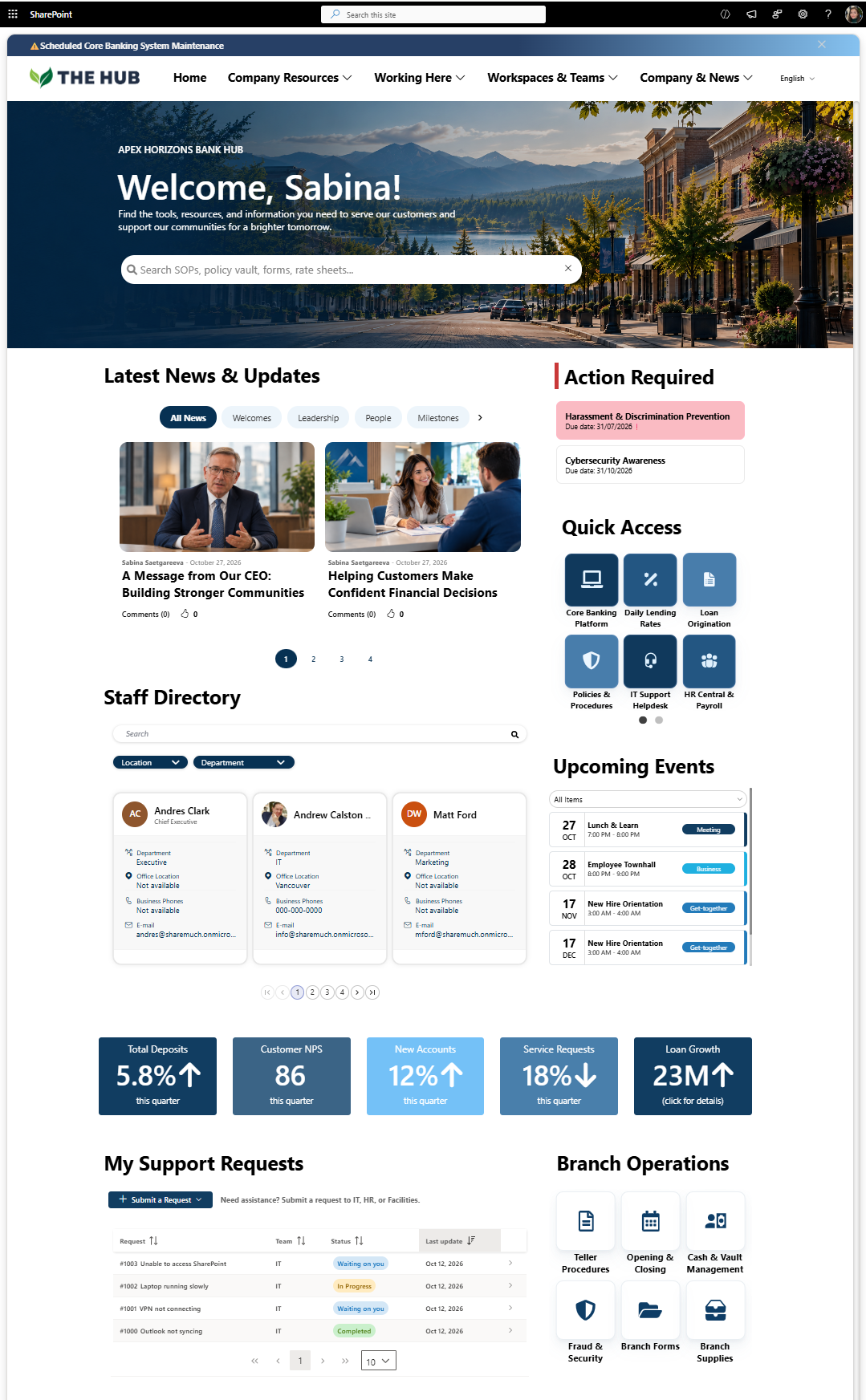
This SharePoint bank intranet example brings these resources together. Employees can find procedures, access banking applications, and keep track of required training, while managers can monitor key performance indicators directly from the homepage.
Bank intranet homepage example showing how employees can access banking procedures, lending rates, compliance training, and operational updates in SharePoint.
Why do employees love this intranet homepage?
Banking policies and procedures are easier to find. A dedicated search bar helps employees look for SOPs while respecting their access permissions. Tellers can find cash handling procedures, while loan processors can access underwriting guidelines.
Required training stays visible. Each employee sees a personalized reminder of their outstanding training, such as cybersecurity awareness and BSA/AML certifications, along with completion deadlines.
Mandatory policy reminders keep employees informed. The “action required “section reminds employees not only about their training but also about updated policies and procedures they need to review and acknowledge, helping compliance teams track outstanding acknowledgments.
Finding the right expert is easier. Employees can search the staff directory by department, role, or branch location to find the right person in Lending, Internal Audit, or BSA Compliance.
System maintenance alerts are easy to spot. A prominent banner at the top of the homepage notifies employees about scheduled core banking system maintenance.
Daily lending rates are easy to access. A dedicated quick link takes employees to lending rate information when assisting customers.
Bank performance is visible at a glance. KPI cards show total deposits, customer satisfaction, new accounts, service requests, and loan growth. Data can be pulled from Excel or Power BI and refreshed automatically to keep the figures up to date.
Employee support is easier to manage. Employees can submit IT, HR, or Facilities requests and track their progress directly from the intranet.
2. Credit Union Intranet Homepage
From opening new member accounts to processing loan applications, credit union employees rely on accurate information throughout the day. Branch teams need access to banking systems and current procedures. Lending teams need up-to-date rates and loan documents. And everyone needs to stay informed about policy changes, fraud alerts, and operational updates.
This SharePoint intranet example brings these resources together on one homepage. Employees can access their everyday tools, search for forms and procedures, and catch up on what's happening across the credit union.
There's also space for employee recognition, new hires, and events that help connect teams working across different branches.
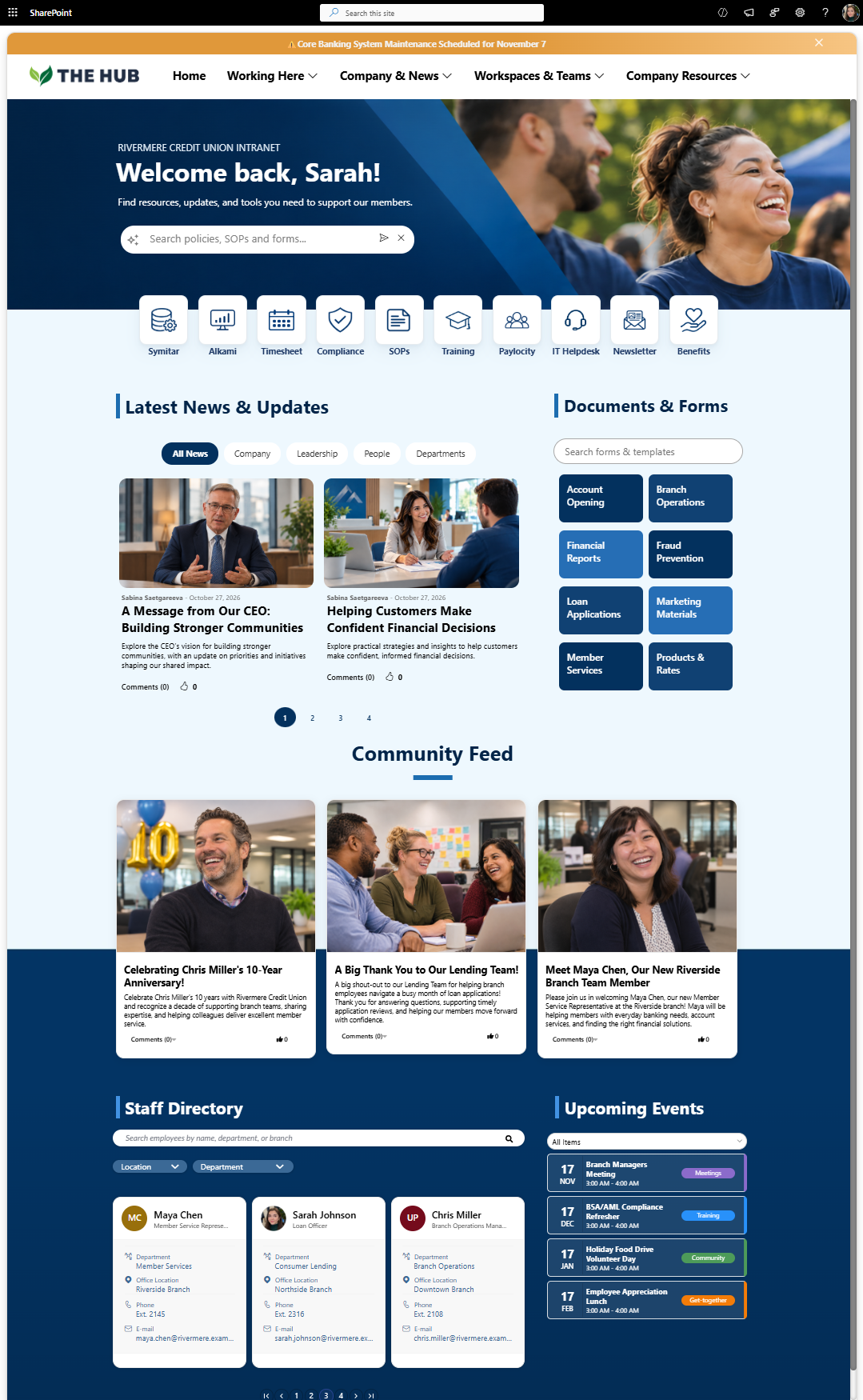
Credit union intranet example bringing member service resources, banking applications, alerts, important updates, and employee communications together on one SharePoint homepage.
Why do employees love this intranet homepage?
Banking tools are one click away. Employees can access core banking systems, member service applications, and employee resources directly from the homepage.
Employees can find answers faster. AI-powered search can answer questions using selected SharePoint content, while a separate documents and forms search helps employees find account-opening forms, loan documents, and other resources across libraries on different SharePoint sites.
Important updates are visible. Fraud prevention reminders, member verification updates, and scheduled system maintenance announcements have a prominent place on the homepage.
News from across the credit union. Employees can filter announcements by Company, Leadership, People, or Departments to keep up with branch updates, policy changes, and other news relevant to their work.
Finding colleagues across branches is easier. The staff directory helps employees locate people in Lending, Branch Operations, Compliance, and other departments, along with their contact information.
Employees stay connected beyond daily work. The community feed features new hires, employee shout-outs, and work anniversaries, while the calendar highlights upcoming training sessions and company events.
3.Free Credit Union Intranet Homepage
Credit union employees need quick access to banking tools, account opening procedures, lending guidelines, and fraud prevention resources to support members. They also need to stay informed about company news and updates.
This free, ready-to-install SharePoint intranet template brings everything together on one homepage. It's built entirely with out-of-the-box SharePoint web parts, with no third-party tools or custom development required.
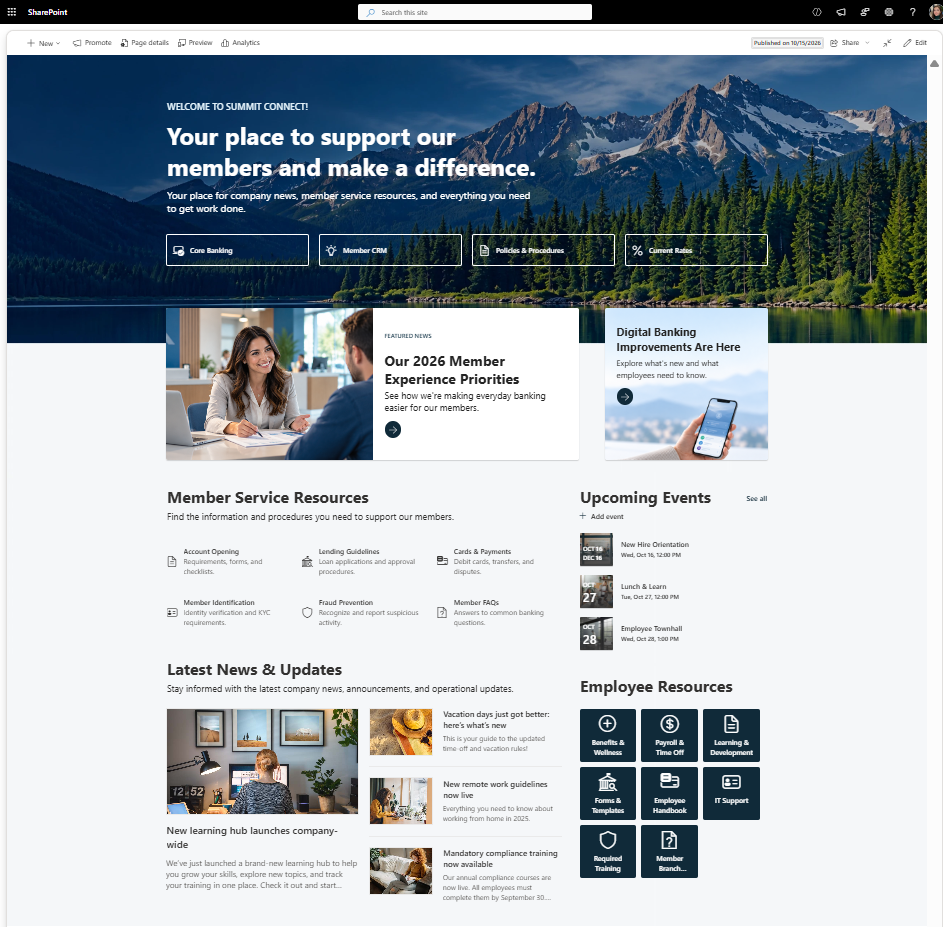
Free, ready-to-install SharePoint intranet template for credit unions, built with out-of-the-box web parts to organize banking tools, member service resources, and employee updates.
Why does this intranet homepage work for credit union employees?
Banking tools are easy to access. Quick links to core banking, member CRM, policies & procedures, and current rates help employees access the systems and information they use throughout the day.
Member service resources are easy to spot. A dedicated section brings together account opening checklists, lending guidelines, card and payment procedures, member identification requirements, fraud prevention resources, and FAQs.
Important updates stay visible. Featured news highlights member experience priorities and digital banking improvements, while the latest news section shares company announcements, learning opportunities, and compliance training updates.
Employees stay connected across branches. Upcoming events highlight new hire orientations, lunch-and-learn sessions, and employee town halls, helping teams stay involved regardless of where they work.
Employee resources are organized in one place. Quick links to benefits, payroll, learning and development, forms, IT support, and required training make everyday workplace information easier to access.
Want to use this design for your intranet? This free SharePoint template is ready to install, with no sign-ups, sales calls, or additional software required.
4. Commercial Real Estate Lending Intranet
Commercial real estate lending involves a lot of coordination. Loan officers need to track deals, underwriting teams need access to credit documents, and portfolio managers need up-to-date information on existing loans.
This SharePoint intranet example is designed around those everyday needs. Employees can open their lending applications, find documents and forms, and stay informed about market developments and company updates.
The homepage also celebrates successful deals and employee achievements, recognizing the teamwork behind commercial real estate financing.
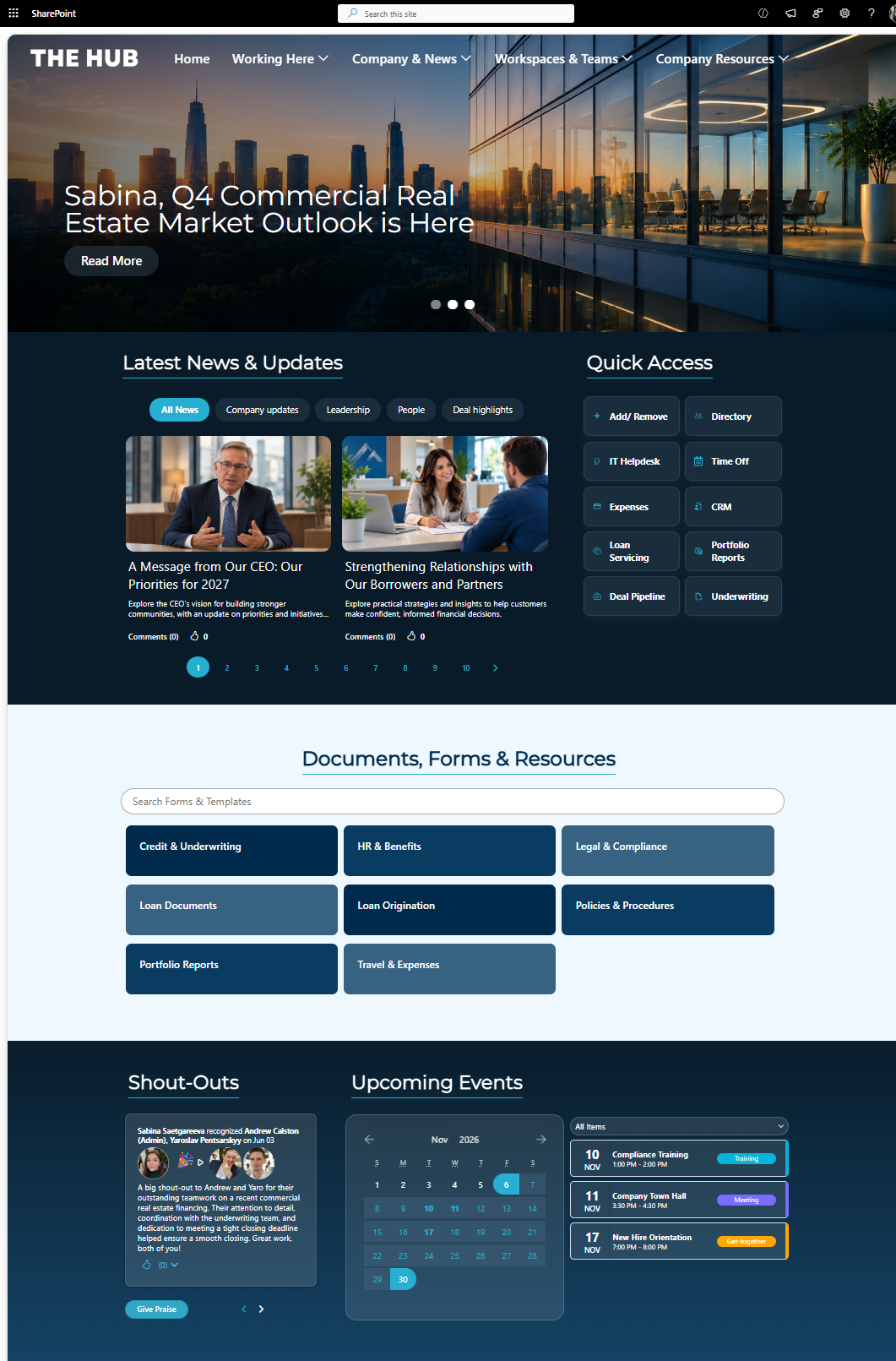
Commercial real estate lending intranet example showing how SharePoint can bring lending applications, loan documents, market updates, and team communications together.
Why do employees love this intranet homepage?
Lending applications are easy to access. Quick links connect employees to their CRM, deal pipeline, underwriting, loan servicing, and portfolio reporting tools.
Loan documents are easier to find. A dedicated Documents, Forms & Resources section lets employees search for forms and templates or browse categories such as Credit & Underwriting, Loan Origination, Loan Documents, and Legal & Compliance.
Market updates are easy to access. A prominent homepage banner highlights the Q4 Commercial Real Estate Market Outlook, giving employees a direct link to the latest market insights.
Teams can follow company and deal updates. Employees can filter news by Company Updates, Leadership, People, and Deal Highlights to stay informed about business priorities and recent activity.
Employees can recognize great work. A Shout-Outs section lets colleagues celebrate achievements, such as a team successfully closing a commercial real estate financing deal.
Important events are easy to find. A calendar highlights upcoming compliance training, company town halls, and new hire orientation sessions.
As you can see, a commercial real estate lending intranet isn't just about organizing documents and applications. It's about helping lending teams stay informed, work together, and find what they need throughout the loan process. And while every financial institution works differently, there are a few intranet design best practices that apply to all of them.
Financial Services Intranet Design Best Practices
So, what makes a bank intranet or financial services intranet actually useful for employees? It's not just about having the right tools. Employees need to find current policies, stay on top of compliance requirements, and see important updates without going through multiple pages.
Here are four best practices to help you get it right.
Make Financial Policies Easy to Find and Keep Up to Date
Loan underwriting guidelines, customer identification procedures, and account-opening requirements can change over time. Employees need to know they're following the latest approved instructions, especially when processing loan applications or opening accounts.
How to do it:
Maintain approved policies in designated SharePoint libraries, with clear ownership and version history.
Set reminders for policy owners to review and update documents.
Make approved policies easy to find. Origami's Finder and Search Banner help employees search for lending guidelines, customer identification procedures, and other documents across multiple SharePoint sites and libraries.
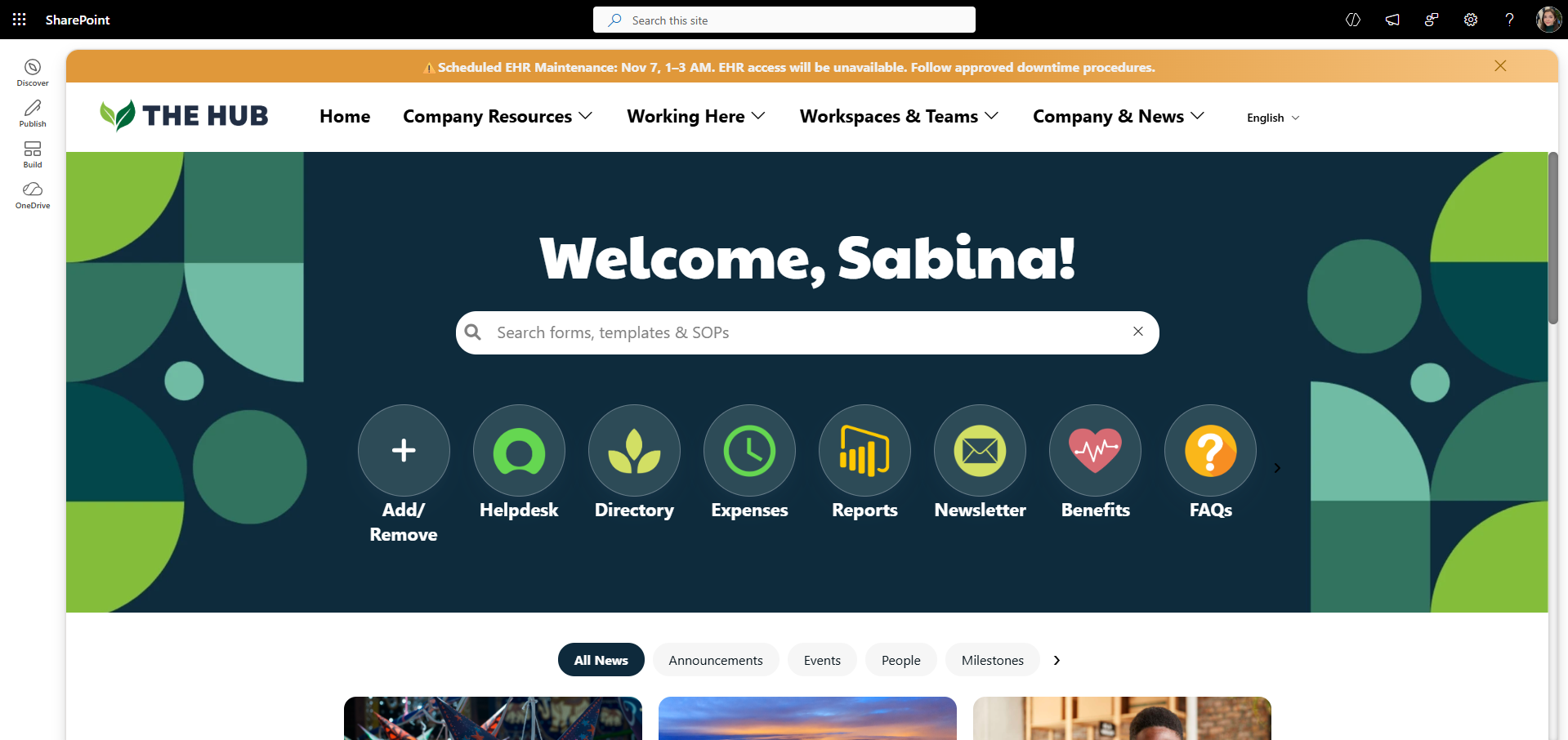
Make financial policies and procedures easier to find with a centralized SharePoint search bar that helps employees locate forms, templates, and SOPs.
Make Required Policy Acknowledgments Easier to Track
When a bank or credit union updates an important policy, employees may need to confirm they've reviewed it. Compliance teams also need to know who has acknowledged the update and who still needs a reminder.
How to do it:
Show employees which policies they need to review and acknowledge.
Let employees acknowledge required policies directly from the intranet.
Track policy acknowledgments. Origami's Mandatory Reads and Compliance Dashboard help compliance teams see who has acknowledged required policies and who still needs to complete them.
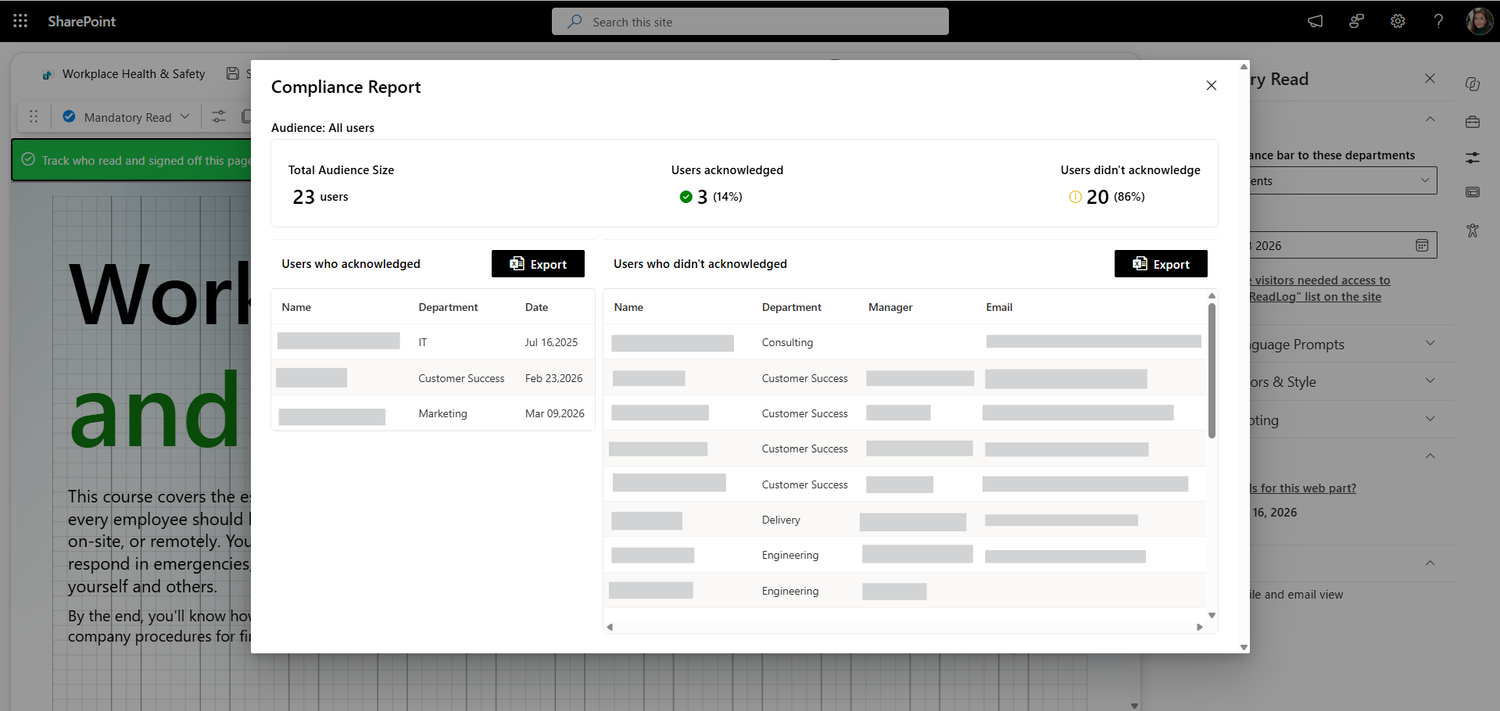
Track required policy acknowledgments in SharePoint and see which employees have completed their reviews and who still needs a reminder.
Protect Sensitive Information Without Making Access Difficult
A branch teller, loan officer, and compliance manager need access to different information. The intranet should make relevant resources easy to find while keeping confidential customer and business information protected.
How to do it:
Give employees access to documents based on their roles and responsibilities.
Use Microsoft 365 security features, including SharePoint permissions and multifactor authentication, to protect confidential information.
Review access permissions regularly as employees change roles or departments.
Make Important Banking Updates Hard to Miss
A core banking outage, a new fraud threat targeting customers or credit union members, or changes to customer verification procedures can affect daily branch operations. Important updates shouldn't get lost among general company announcements.
How to do it:
Show operational updates to the branches or departments that need them.
Use prominent alerts for urgent issues, such as core banking outages or active phishing threats.
Highlight urgent banking alerts. Origami's Alert web part helps employees quickly see important notifications, such as core banking outages or fraud warnings, directly on the intranet homepage.
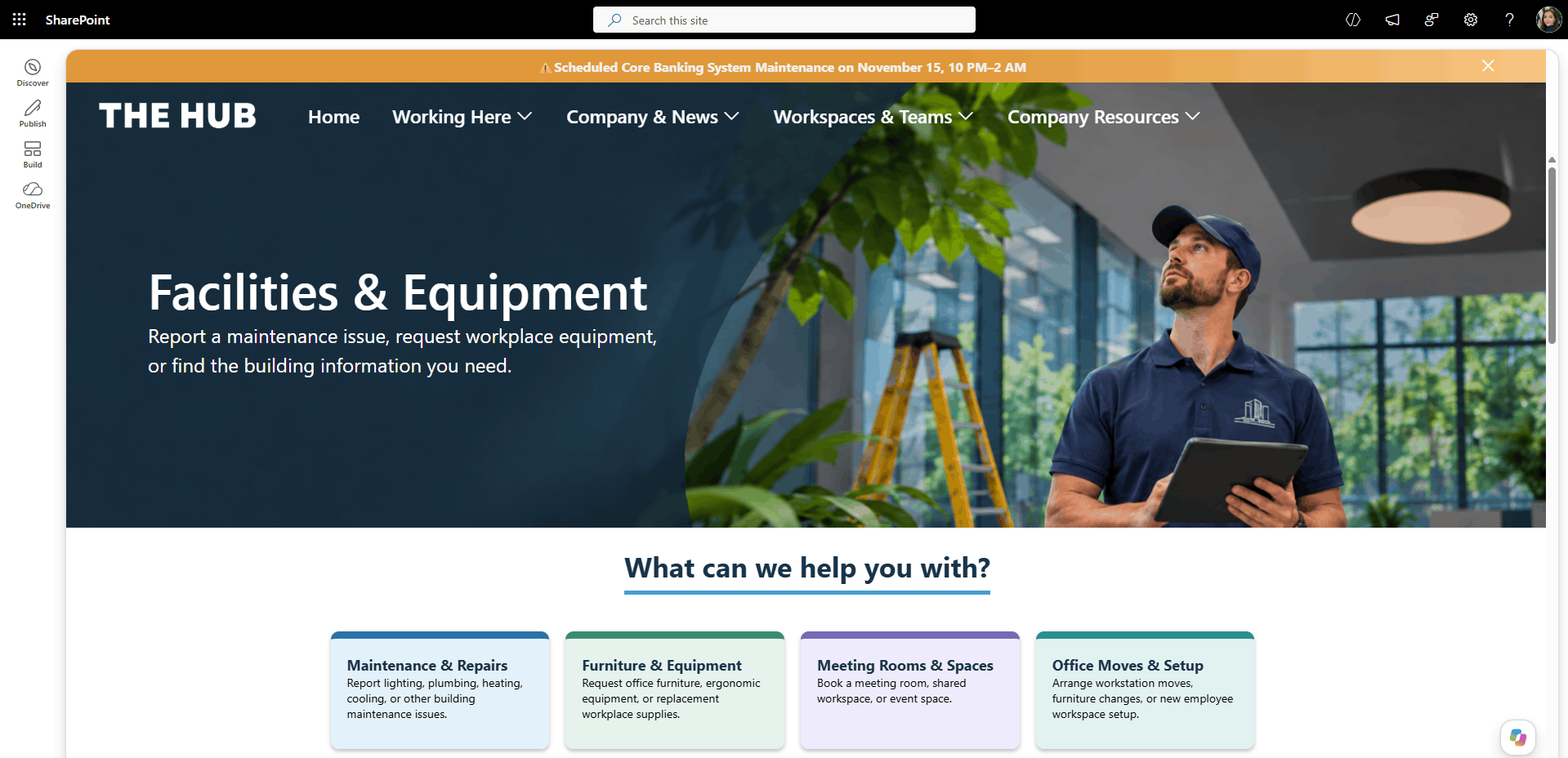
Origami's Alert web part keeps important banking updates, such as scheduled system maintenance, visible across SharePoint intranet pages.
So, what do all these best practices have in common? It's about helping employees find current policies, stay on top of compliance requirements, and see important updates, without compromising security. But how do you actually bring all of this together? That's where SharePoint comes in.
Why use SharePoint for your Intranet?
Beyond convenience, SharePoint helps financial institutions address three important challenges:
Keeping sensitive information secure. Financial institutions handle confidential information every day. SharePoint provides security controls, document versioning, and integration with Microsoft Purview to help organizations manage information and support compliance requirements.
Making sure employees see the right information. A branch teller needs quick access to lending guidelines, but shouldn't be able to open confidential audit reports. SharePoint lets organizations control who can access different documents and resources.
Getting more from Microsoft 365. Many financial institutions already have SharePoint included in their Microsoft 365 subscriptions. Instead of paying for a separate intranet platform, they can use the tools they already have.
And because SharePoint is flexible, banks and credit unions can design their intranets around how employees actually work. But what if you need more than the standard features, without spending months on custom development? That's where Origami can help.
Build your Financial Intranet Faster with Origami
Building a fully functional intranet with features like advanced search, personalized employee resources, internal service requests, compliance tracking, and more can be difficult using standard SharePoint web parts alone.
Origami extends SharePoint with ready-to-install intranet templates and web parts designed to help banks, credit unions, and other financial companies create more useful employee experience without custom development.
Everything runs within your Microsoft 365 environment, using your existing SharePoint permissions and security controls, with no external hosting or data storage.
Want to see how Origami can improve your SharePoint intranet? Explore all Origami features below to see what's possible.

Sabina Saetgareeva is a Digital Marketing Specialist at ORIGAMI. She helps infuse ORIGAMI brand with what customers need and seek. Sabina is an avid reader of the future of work, digital transformation, and trends in Digital Employee Experience.