
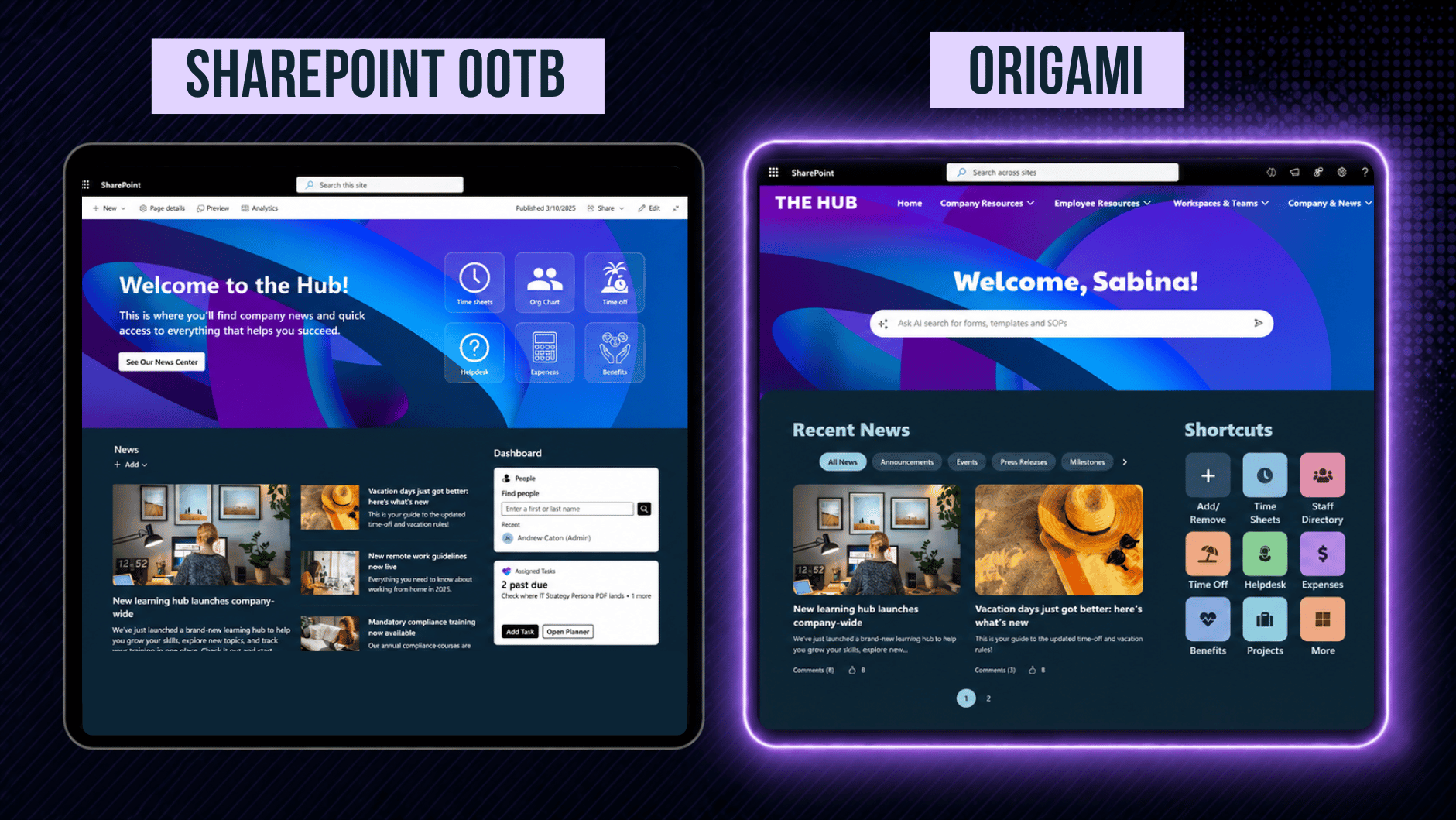
Modern SharePoint can look much better than many people expect.
In this test, we built a modern intranet homepage using only native SharePoint web parts and design tools. Then we rebuilt the same homepage vision using Origami SharePoint web parts.
The goal was not to make SharePoint look bad. The goal was to see how far native SharePoint can go when it is pushed with strong design skills, careful layout choices, and no custom code.
The result was interesting: native SharePoint can create a clean and professional homepage. But some experiences still require compromises, especially around AI search, personalization, advanced people discovery, compliance tracking, audience targeting, social feeds, and interactive calendars.
Watch the full homepage comparison to see how far native SharePoint can go and where additional capabilities from Origami make a difference.
What We Tested
We wanted to create a modern SharePoint intranet homepage with the sections employees usually expect:
A welcoming homepage banner
Quick access to important links
Company news
People search
Task reminders
Priority cards
Social updates
Events
First, we built the homepage using native SharePoint. Then we created the closest possible version using Origami.
The two pages are not identical because native SharePoint cannot recreate every experience in the Origami version. That is the point of the test. We wanted to see where native SharePoint works well, where it needs workarounds, and where Origami adds capabilities that are difficult or not available out of the box.
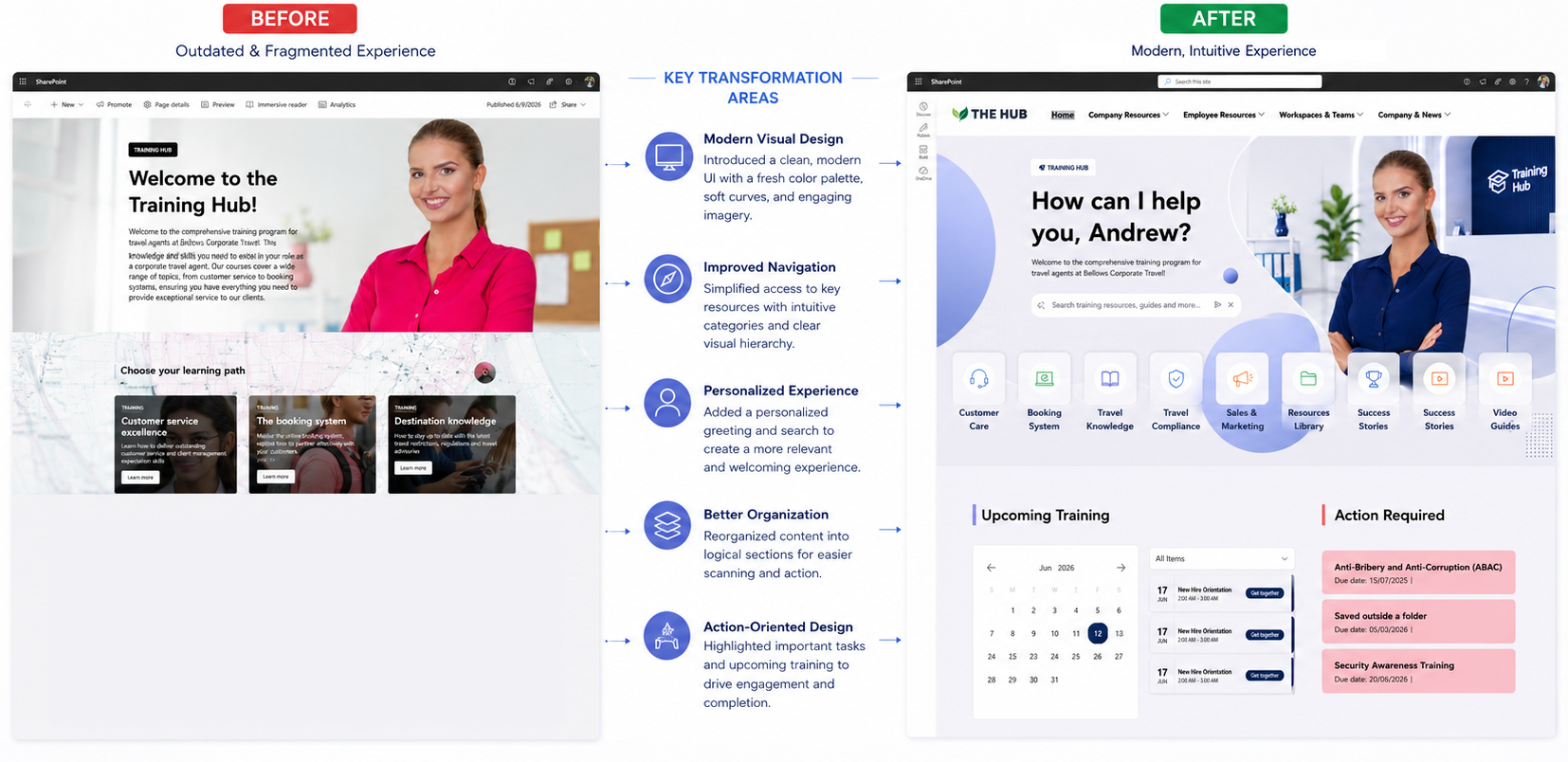
The Native SharePoint Homepage
The native SharePoint version started strong.
Using flexible sections, background images, text, buttons, images, links, news, editorial cards, dashboard cards, Viva Engage conversations, and the Events web part, it is possible to create a homepage that feels clean and modern.
The native version is a good option when an organization needs a simple homepage with company updates, links, announcements, and a few structured content blocks.
It also has an important advantage: everything is built directly inside SharePoint, using tools many Microsoft 365 teams already know.
But as the homepage became more ambitious, we started running into limitations.
1. Homepage Banner: Static Welcome vs AI Search Experience
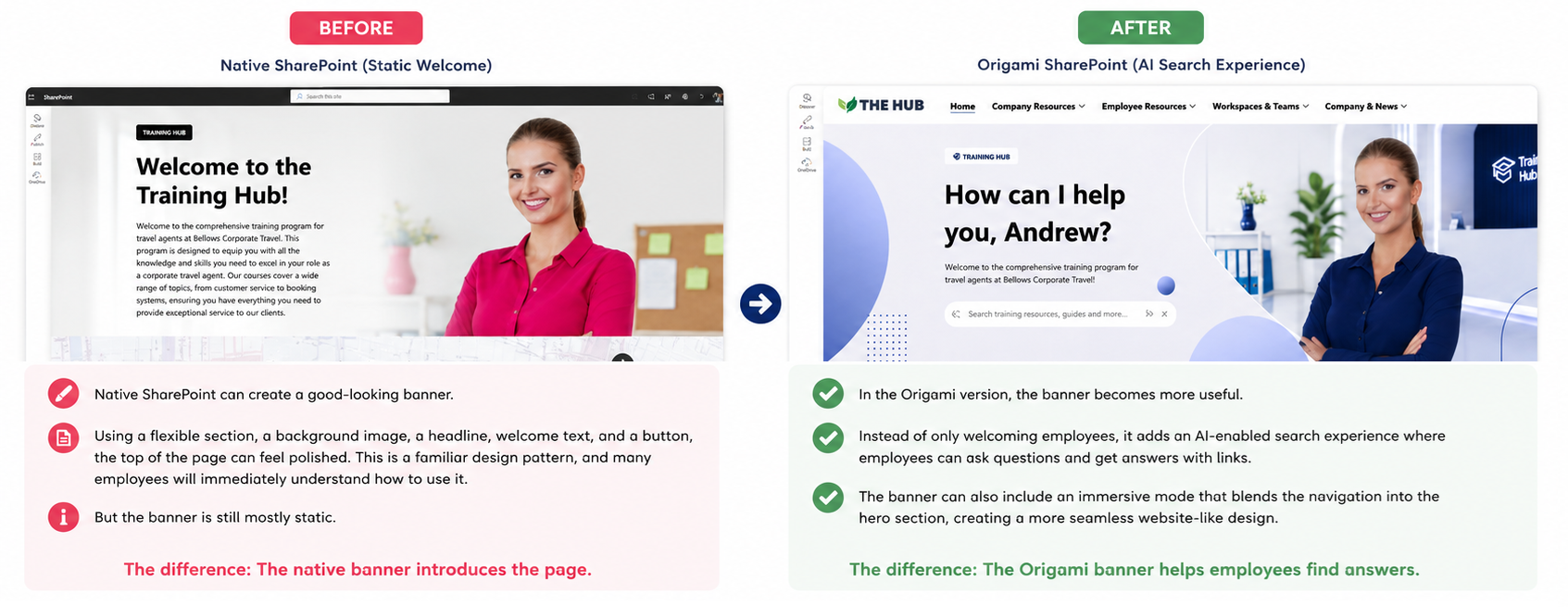
Native SharePoint can create a good-looking banner.
Using a flexible section, a background image, a headline, welcome text, and a button, the top of the page can feel polished. This is a familiar design pattern, and many employees will immediately understand how to use it.
But the banner is still mostly static.
In the Origami version, the banner becomes more useful. Instead of only welcoming employees, it adds an AI-enabled search experience where employees can ask questions and get answers with links. The banner can also include an immersive mode that blends the navigation into the hero section, creating a more seamless website-like design.
The difference is not only visual. The native banner introduces the page. The Origami banner helps employees find answers.
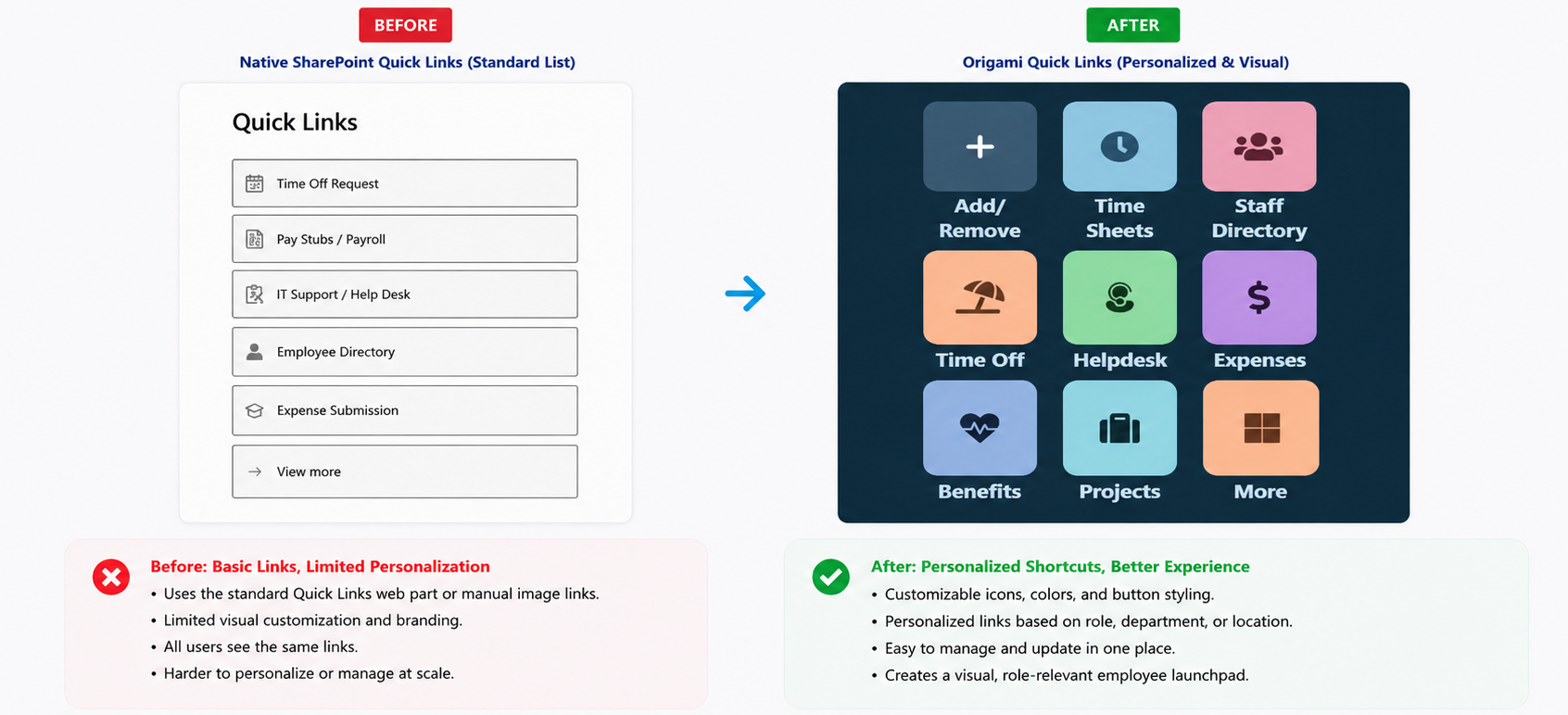
2. Quick Links: Custom Visual Links vs Personalized Shortcuts
Native SharePoint gives you a few ways to create quick links.
You can use the standard Quick Links web part, or you can use images inside a flexible section to create more custom visual tiles. With good design choices, this can look surprisingly polished. You can choose your own icons, shapes, and imagery, and create a more branded experience without code.
The limitation appears when you want the links to become more personalized and easier to manage.
With Origami Quick Links, each button can have custom styling, icons, colors, and design settings. Employees can also have a more personalized shortcut experience, including links that are relevant to their role or work.
Native SharePoint can display links. Origami helps turn links into a more flexible employee launchpad.
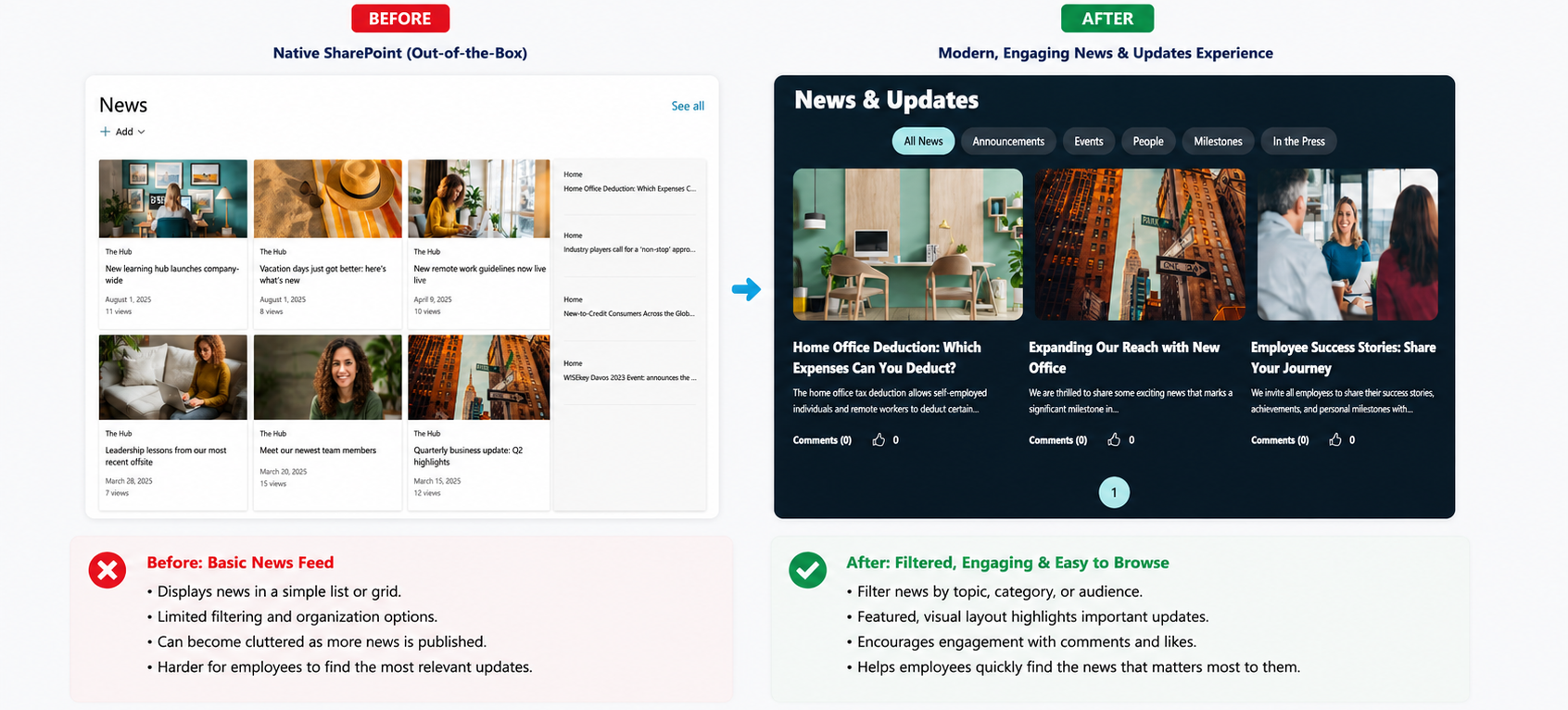
3. News: Basic News Feed vs Filtered and Engaging News Experience
The native SharePoint News web part is one of the stronger out-of-the-box options.
It can display company updates, announcements, and news posts directly on the homepage. For many organizations, this is enough.
But as an intranet grows, news can become harder to browse. Employees may want to filter by topic, department, or category. Communicators may want a cleaner way to organize multiple types of updates without creating a cluttered homepage.
Origami adds a more structured news experience with filtering and engagement options, helping employees find the news that matters to them faster.
Native SharePoint can publish news. Origami helps make news easier to browse, organize, and act on.
4. People Search: Name Search vs Employee Directory
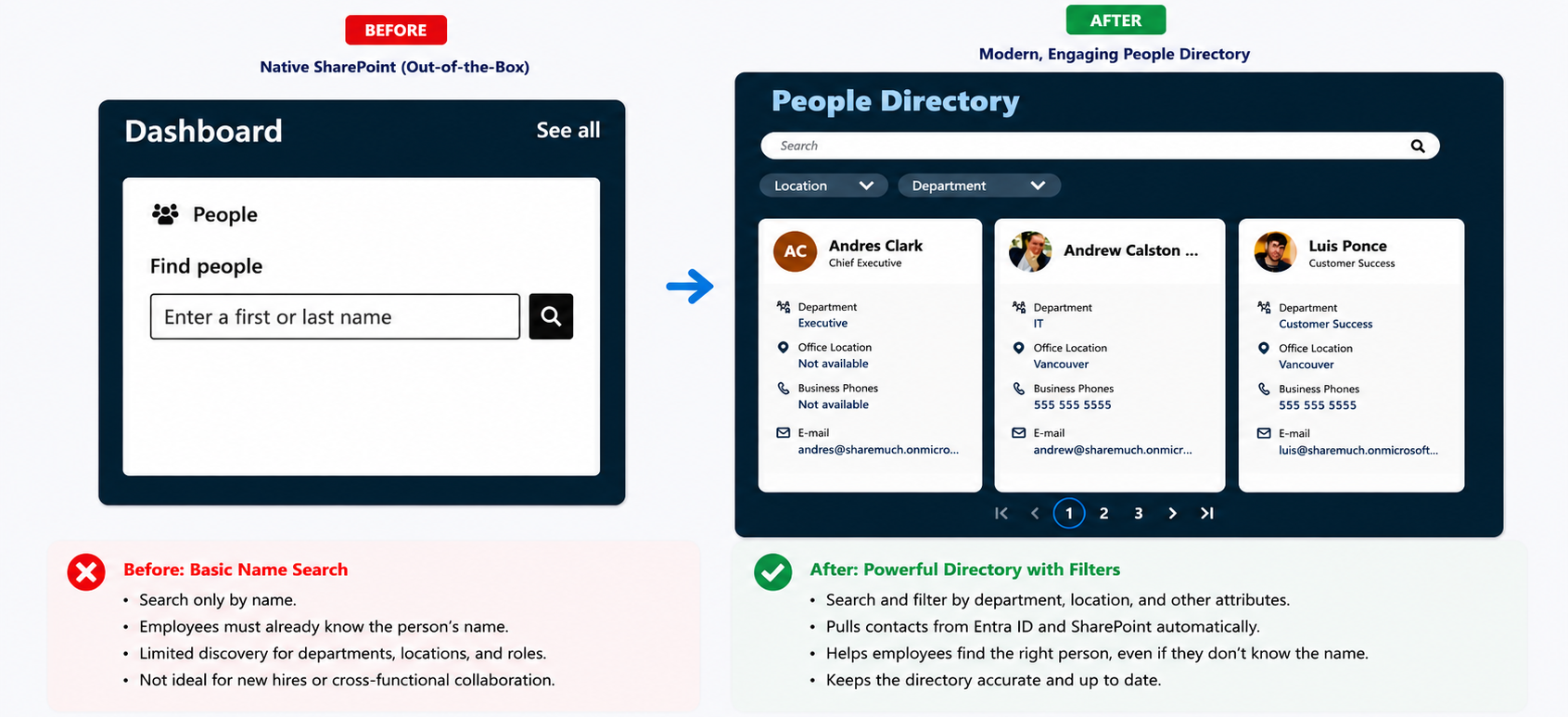
Native SharePoint can provide a simple people search experience through dashboard-style cards.
This is useful when employees already know who they are looking for.
The problem is that many employees do not search that way. New hires, frontline employees, or employees working across departments often do not know the person’s name. They know they need someone in HR, Finance, Procurement, IT, or a specific location.
That is where native SharePoint becomes limited.
With Origami People Directory, employees can search and refine people by department, location, and other profile attributes from Entra ID or SharePoint. Contacts are pulled from Entra ID and updated automatically.
Native SharePoint helps employees find a known person. Origami helps employees explore the organization.
5. Tasks: Individual Tasks vs Mandatory Reads and Compliance Tracking
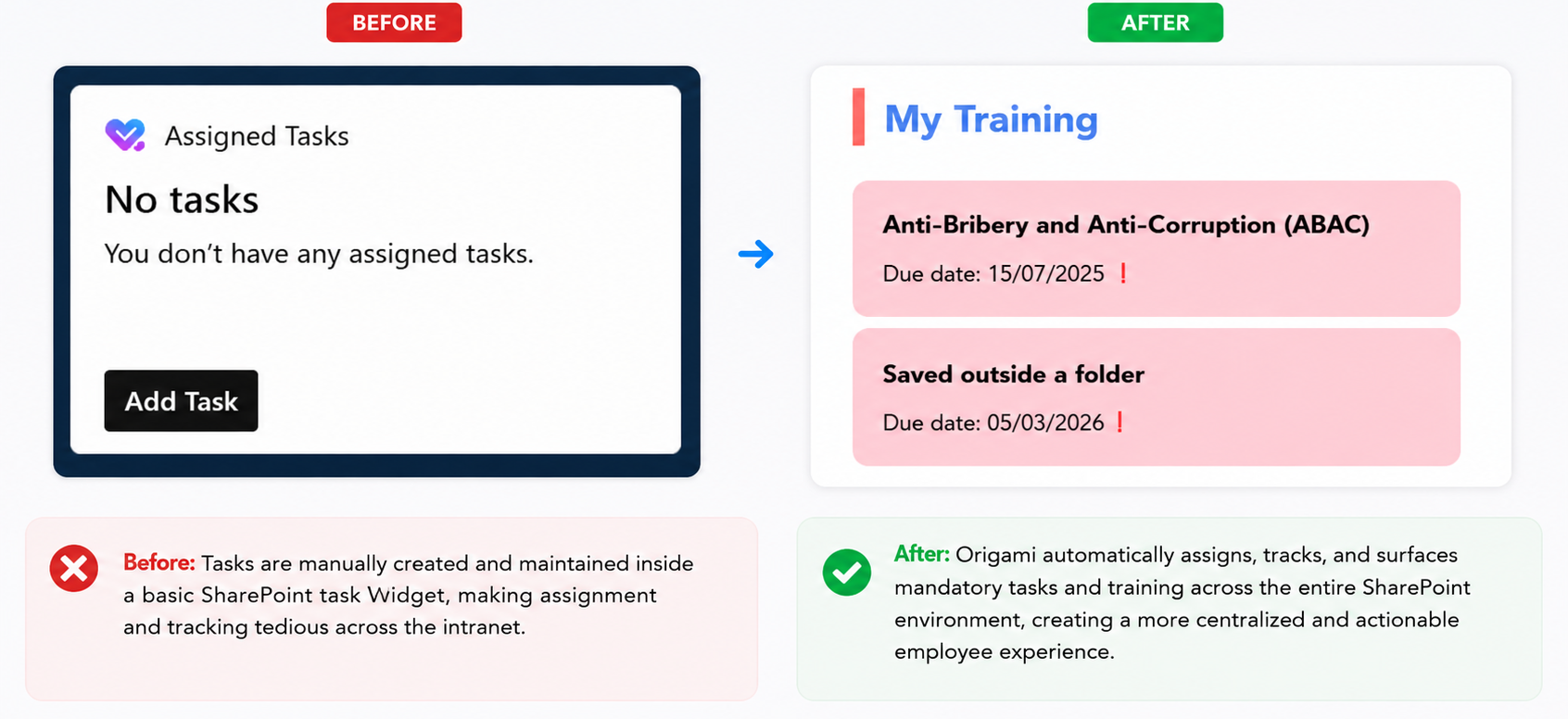
Native SharePoint can show assigned tasks.
That sounds useful, but in practice it can be limited for intranet scenarios. Someone needs to assign the task individually, and employees often do not want to manage intranet tasks manually.
For compliance, HR, policies, onboarding, or required reading, organizations usually need something more structured.
With Origami Mandatory Read Reminders, tasks are tied to required pages or documents employees must acknowledge. When an employee completes the read, the item disappears from their task list automatically.
Admins can designate a SharePoint page as a mandatory read, target users by department, and track completion with analytics.
Native SharePoint can show tasks. Origami helps manage required employee actions at scale.
6. Priority Cards: Editorial Cards vs Targeted Cards
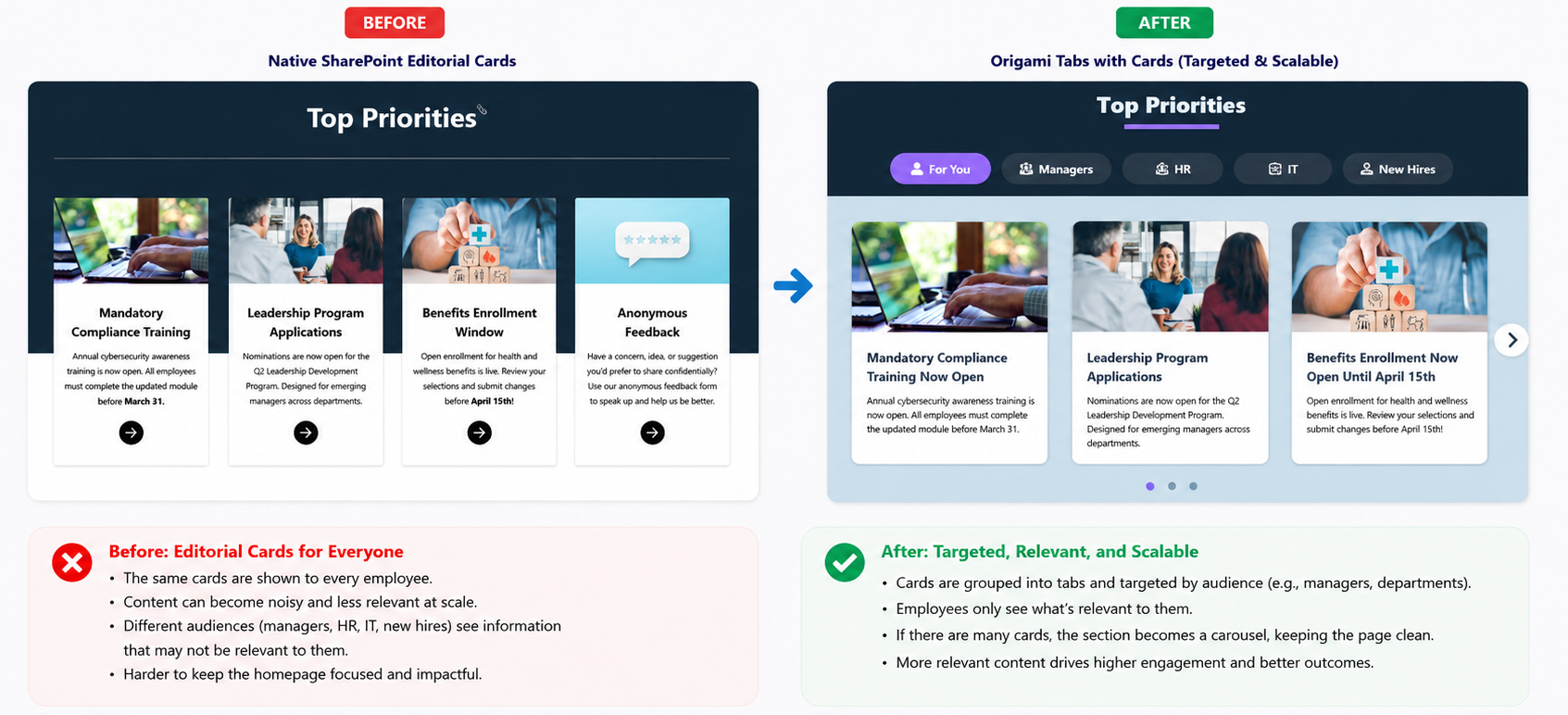
Native SharePoint editorial cards are useful.
They help break up information visually and make a page feel more organized than a wall of text. You can use them for initiatives, enrollment windows, leadership programs, compliance training, or important campaigns.
The limitation is targeting and scale.
If every employee sees the same cards, the homepage can quickly become noisy. Managers may need different content than employees. HR may need different content than IT. New hires may need different content than long-time staff.
Origami Tabs with Cards allows content to be grouped into tabs and targeted by audience, such as managers or departments. If there are many cards, the section can become a carousel, keeping the page cleaner.
Native SharePoint can make content look better. Origami helps make content more relevant.
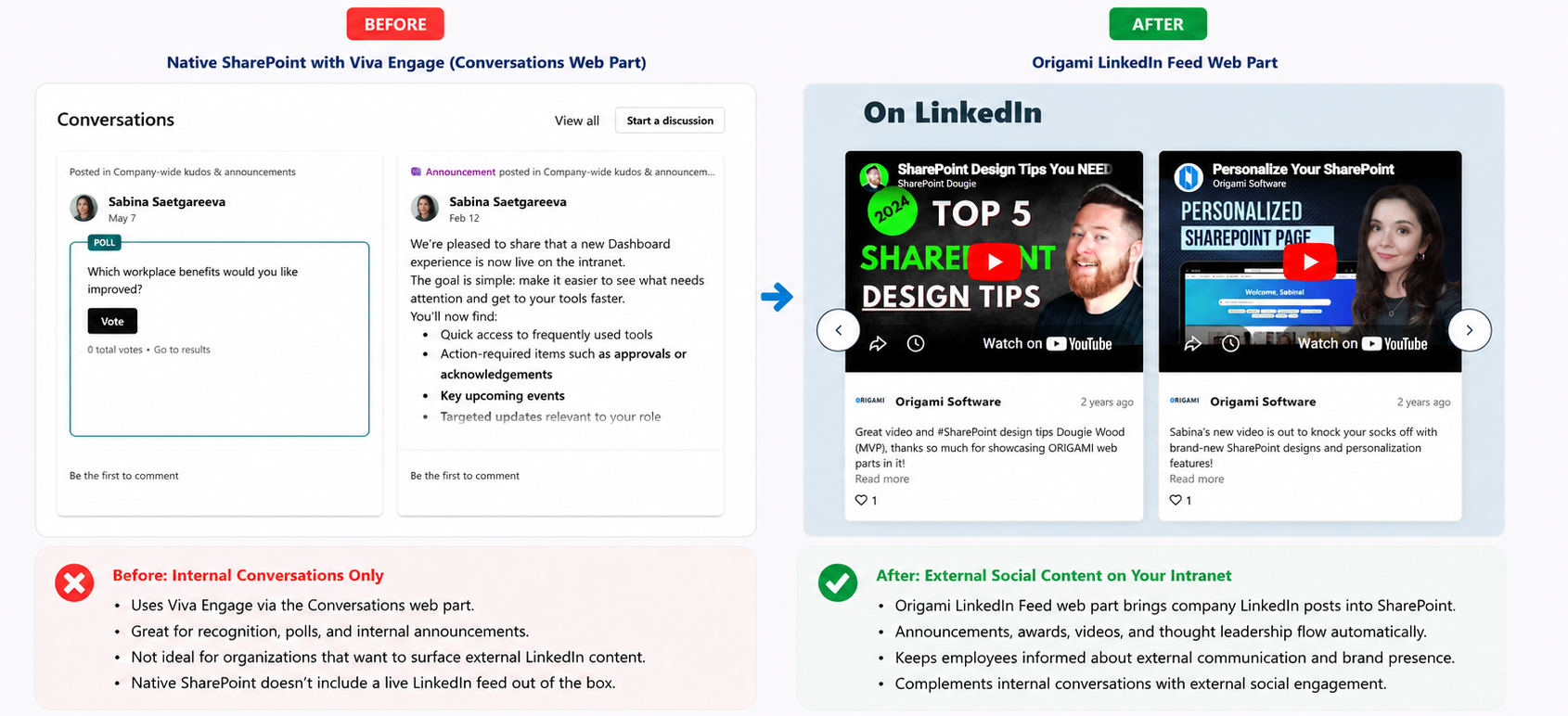
7. Social Feed: Viva Engage vs LinkedIn Feed
Native SharePoint integrates with Viva Engage through the Conversations web part.
This is a good fit for organizations that actively use Viva Engage for employee recognition, micro-announcements, polls, and internal conversations.
But not every organization uses Viva Engage. Some companies prefer to mirror their corporate LinkedIn feed so employees can see what the company is sharing externally.
Native SharePoint does not provide a live LinkedIn feed out of the box.
With the Origami LinkedIn Feed web part, company LinkedIn posts can appear directly on the intranet. Announcements, awards, videos, and thought leadership can flow into SharePoint automatically.
Native SharePoint supports internal social conversations. Origami can bring external social communication into the intranet.
8. Events: Simple Event List vs Full Calendar Experience
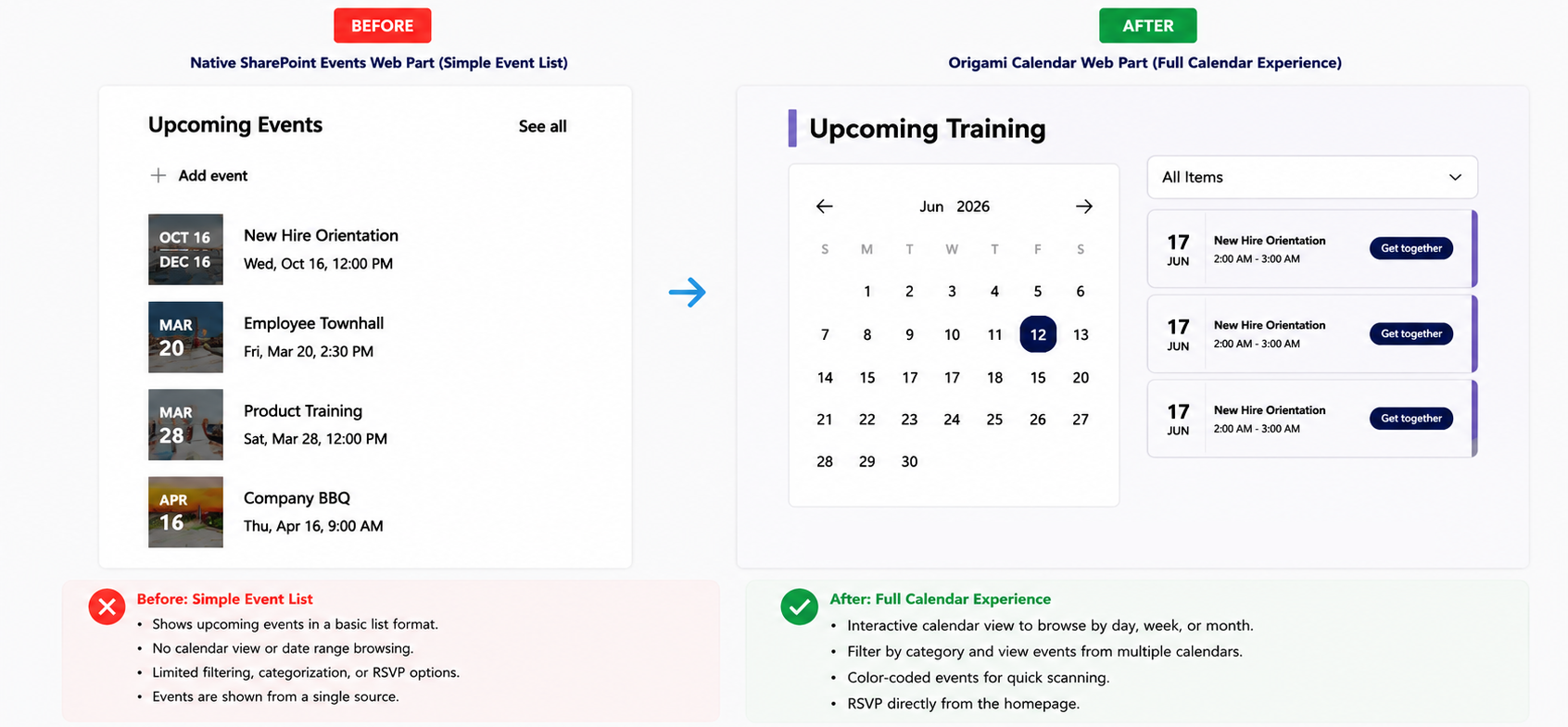
The native SharePoint Events web part is clean and useful.
It can show upcoming events from the site, and employees can click into an event to see more details.
But many organizations need more than a simple upcoming-events list. They want a month view, category filters, color-coded events, events from multiple calendars, and RSVP functionality.
The Origami Calendar web part provides a more complete calendar experience. Employees can browse events by date range, filter by category, view events from multiple sources, and RSVP directly from the homepage.
Native SharePoint makes events visible. Origami makes events easier to browse and act on.
Native SharePoint vs Origami: What Changed?
The biggest difference was not that one page looked good and the other looked bad.
The native SharePoint homepage looked clean, modern, and usable.
The difference was that the Origami version made the homepage more interactive, personalized, and operational.
Native SharePoint was strongest for visual structure, basic communication, and simple page building.
Origami became valuable when the homepage needed to do more than display information. It helped with AI search, personalization, employee discovery, compliance reads, targeted content, LinkedIn feeds, and interactive calendars.
When Native SharePoint Is Enough
Native SharePoint may be enough if your organization needs:
A simple homepage
Company news
Basic quick links
A few announcements
A clean visual layout
A lightweight intranet presence
For many teams, that is a perfectly reasonable starting point.
When Origami Makes Sense
Origami starts to make sense when your SharePoint homepage needs to become more than a static page.
It is especially useful when you need:
Better homepage design flexibility
AI search experiences
Personalized quick links
Advanced people directory search
Mandatory read tracking
Audience-targeted cards
LinkedIn feed integration
A fuller calendar experience
More reusable intranet design patterns
In other words, native SharePoint can help you build a modern-looking homepage. Origami helps turn that homepage into a more useful employee experience.
| Capability | Native SharePoint | Origami on SharePoint |
|---|---|---|
| Modern homepage banner | Yes — strong visual banner with flexible sections, image, text, and buttons. | Yes — immersive banner with AI search, greeting, and blended navigation. |
| AI-powered search | No — search experience remains separate from the homepage design. | Yes — employees can ask questions and receive answers with links. |
| Personalized quick links | Limited — links can be styled, but personalization is limited. | Yes — customizable buttons, targeting, and employee-friendly shortcuts. |
| Advanced people directory | Limited — useful when employees already know who they need. | Yes — search and filter by department, location, and profile attributes. |
| Mandatory reads and compliance tracking | No — requires manual task or process workarounds. | Yes — assign, target, acknowledge, and track completion. |
| Audience-targeted cards | Limited — good visual cards, but less flexible targeting. | Yes — tabs, cards, carousel behavior, and group targeting. |
| LinkedIn feed | No — no native live LinkedIn feed web part. | Yes — mirror company LinkedIn updates into SharePoint. |
| Calendar experience | Limited — clean upcoming events list. | Yes — month view, filters, color coding, multiple sources, and RSVP. |
Final Verdict: Can Native SharePoint Create a Modern Intranet Homepage?
Yes, native SharePoint can create a modern intranet homepage.
With the right design skills, flexible sections, native web parts, and careful layout decisions, SharePoint can look much better than many organizations realize.
But there are limits.
During this test, native SharePoint handled the basic homepage structure well. The compromises appeared when the page needed deeper functionality: AI answers, personalization, advanced people search, compliance tracking, audience targeting, LinkedIn feeds, and interactive calendar actions.
So the best answer is this:
Native SharePoint can create a modern homepage. Origami helps create a more personalized, interactive, and easier-to-manage intranet experience on top of SharePoint.
| Use Native SharePoint When... | Use Origami When... |
|---|---|
| You need a simple intranet homepage. | You need a more personalized employee experience. |
| Your homepage mainly displays news, links, and announcements. | Your homepage needs AI search, advanced navigation, and targeted content. |
| You do not need compliance read tracking or employee acknowledgement. | You need mandatory reads, completion tracking, and analytics. |
| Your employees usually know exactly what they are looking for. | Employees need help discovering people, resources, events, and updates. |