
This SharePoint help desk template includes a fully functional ticketing system built with ready-made SPFx web parts. Employees can submit and track support tickets, communicate with support teams, and receive email updates.
IT, HR, Facilities, and other service teams get dedicated dashboards to manage requests, assign tickets, and track progress. Everything runs directly in your Microsoft 365 tenant, with no Power Apps, Power Automate, or custom coding required.
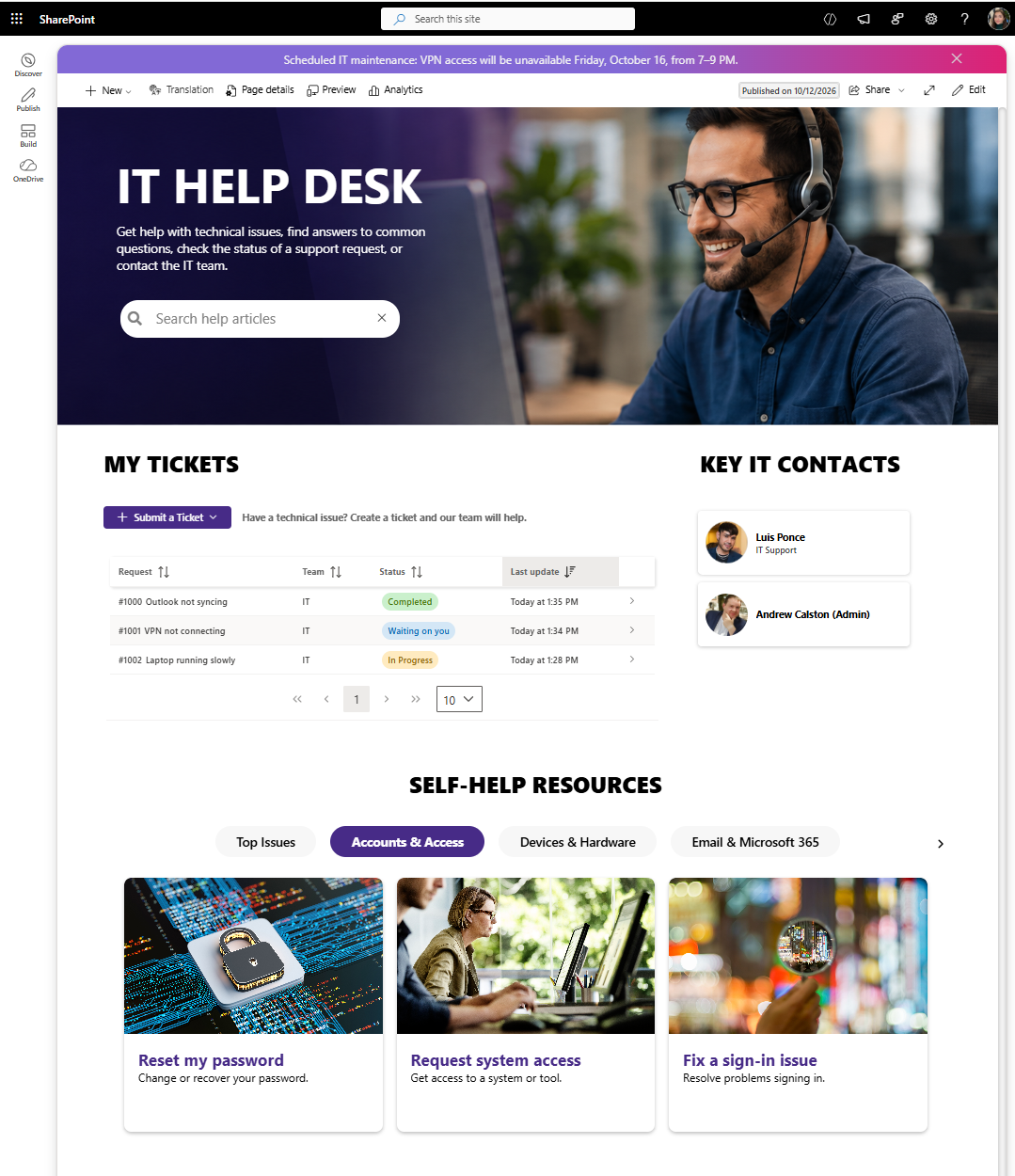
SharePoint IT Help Desk template with ticket tracking, self-help resources, and IT contacts.
Included SharePoint Web Parts & Features
Origami Service Requests Web Part
- Submit and track IT, HR, and Facilities support tickets
- Configure request types and customize ticket categories
- Attach files and reply to support teams
- View ticket statuses and conversation history
Origami SharePoint Ticketing Dashboard
- Manage assigned and unassigned tickets from a dashboard
- Filter requests by team, status, priority, and category
- Assign tickets, update statuses, and respond to employees
- Manage separate support queues across SharePoint team sites
Origami Alert Web Part
- Display IT announcements, service alerts, and maintenance notices
- Customize alert text, colors, font sizes, and links
- Display the same alert across multiple SharePoint sites
Origami Search Banner Web Part
- Help employees find IT guides, FAQs, and self-service resources
- Create a custom search across selected SharePoint sites, libraries, and views
SharePoint Ticketing System Features:
Submit Support Tickets in SharePoint
Make it easy for employees to request help directly from their SharePoint intranet. They can select a request category, describe their issue, attach files, and submit a ticket in just a few clicks.
Customize ticket categories to match the types of requests your support team handles.
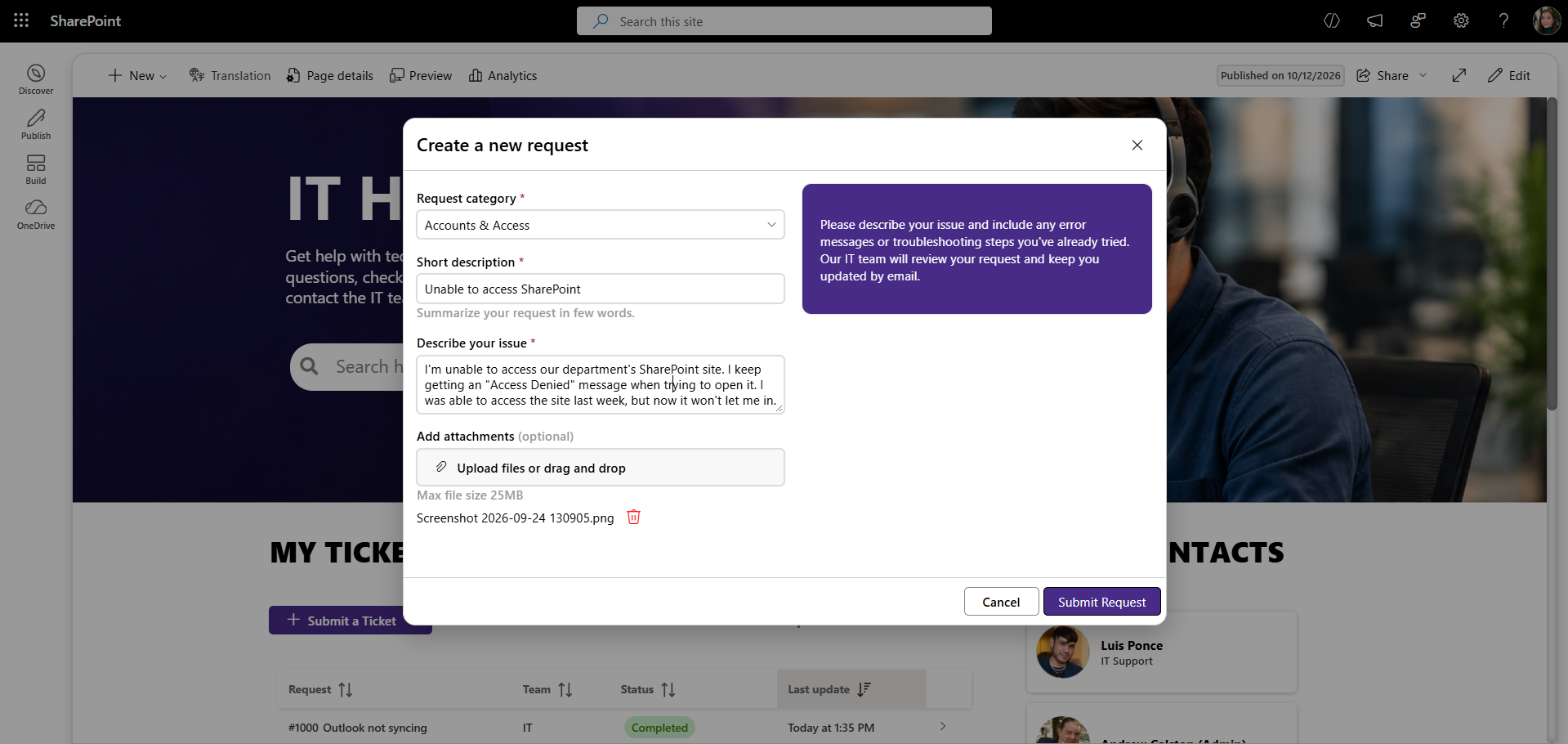
Employees can submit support tickets directly in SharePoint, select a category, and attach files.
Track Tickets and Get Updates
Employees can track their requests, check ticket statuses, reply to support teams, attach files, and receive email notifications as their requests progress.
Each employee can only see their own tickets and participate in conversations. Ticket properties such as priority, status, and assignment are managed by support teams.
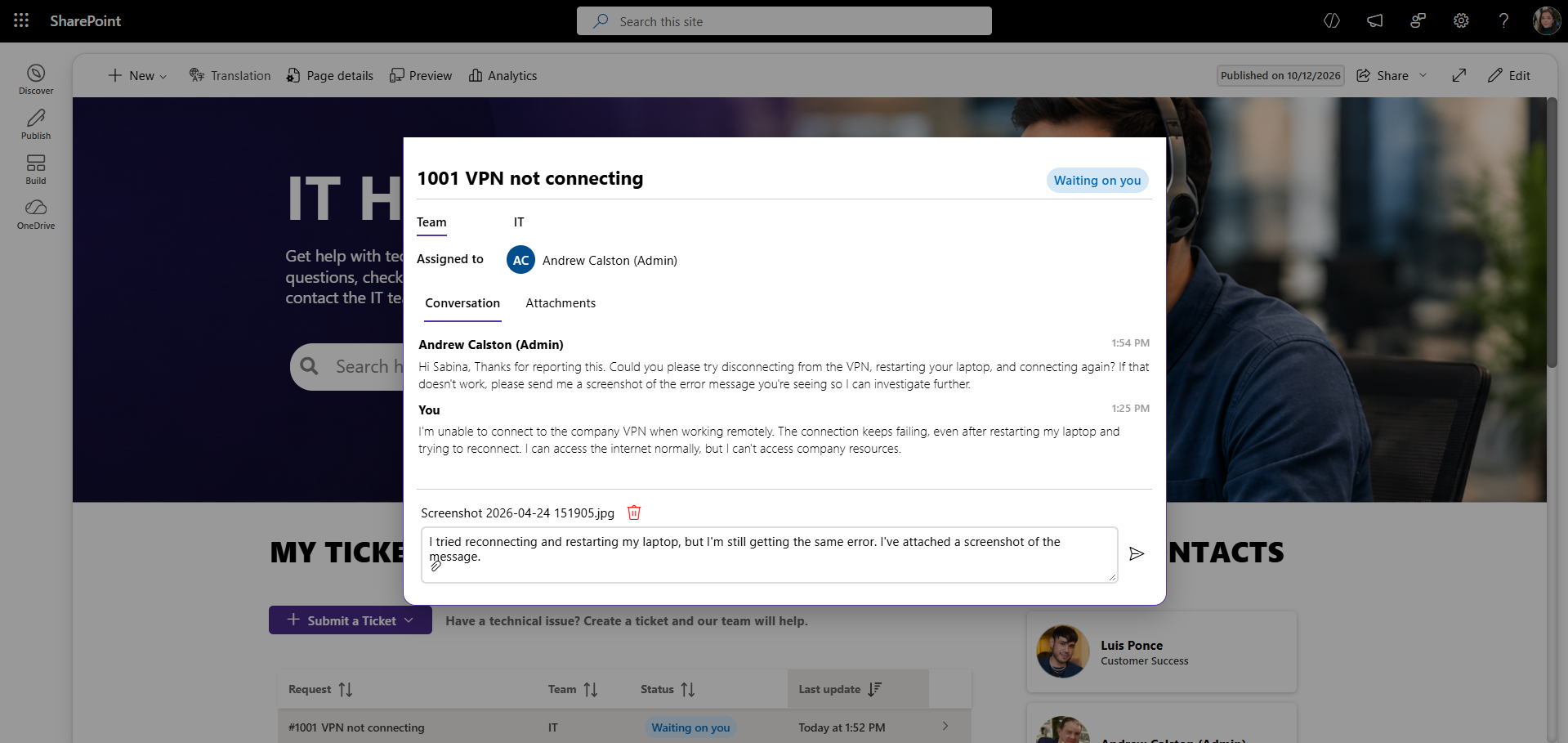
Employees can track ticket statuses, view updates, and communicate with support teams.
Manage Tickets with a SharePoint Help Desk Dashboard
Give each support team a dedicated dashboard to manage incoming requests directly from its SharePoint site. Teams can view assigned and unassigned tickets, filter by status, ticket category, or priority, and quickly identify requests that need attention.
Each team has its own request list, so IT, HR, and Facilities can manage their tickets independently.
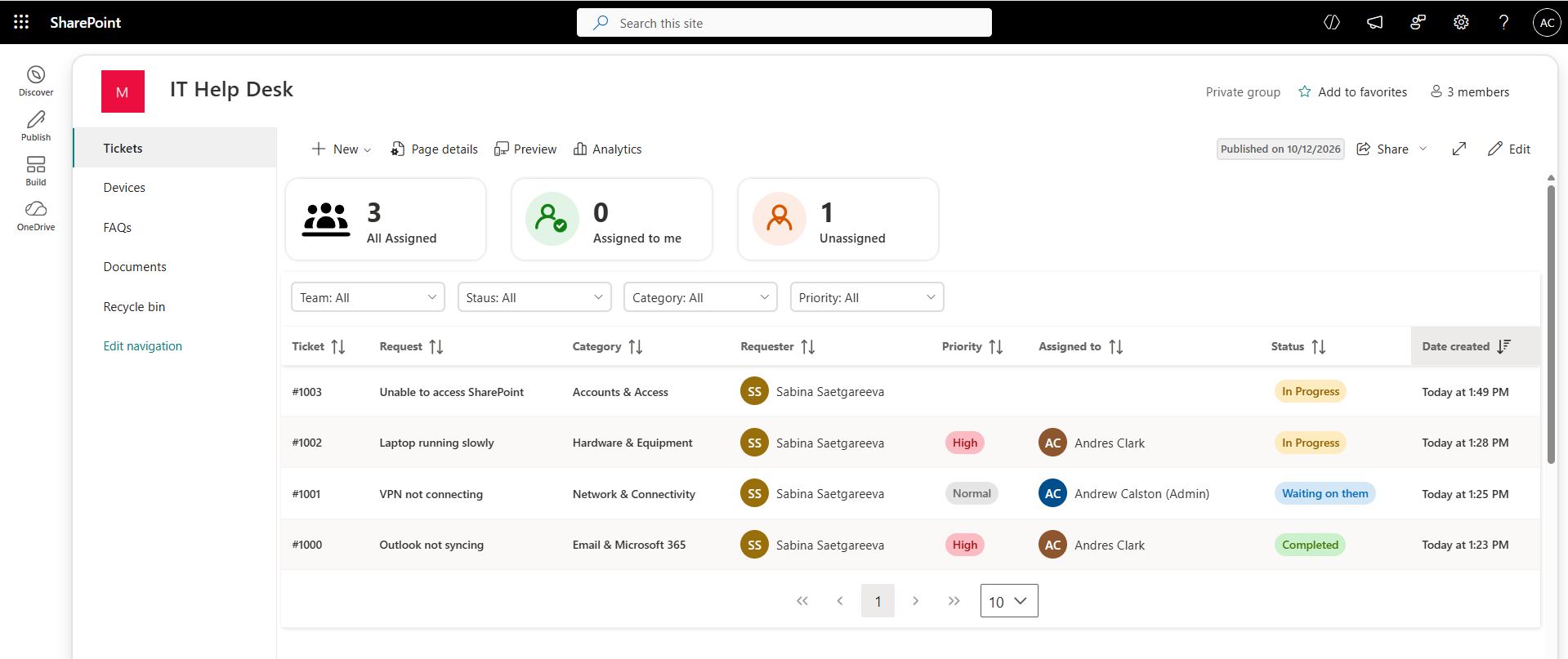
SharePoint ticketing dashboard for managing, filtering, and assigning support requests.
Assign Tickets and Respond to Requests
Support teams can see who submitted each ticket, assign requests to team members, update priorities and statuses, and respond directly to employees.
Conversations, attachments, and ticket details stay together, making it easier to manage requests from submission to resolution.
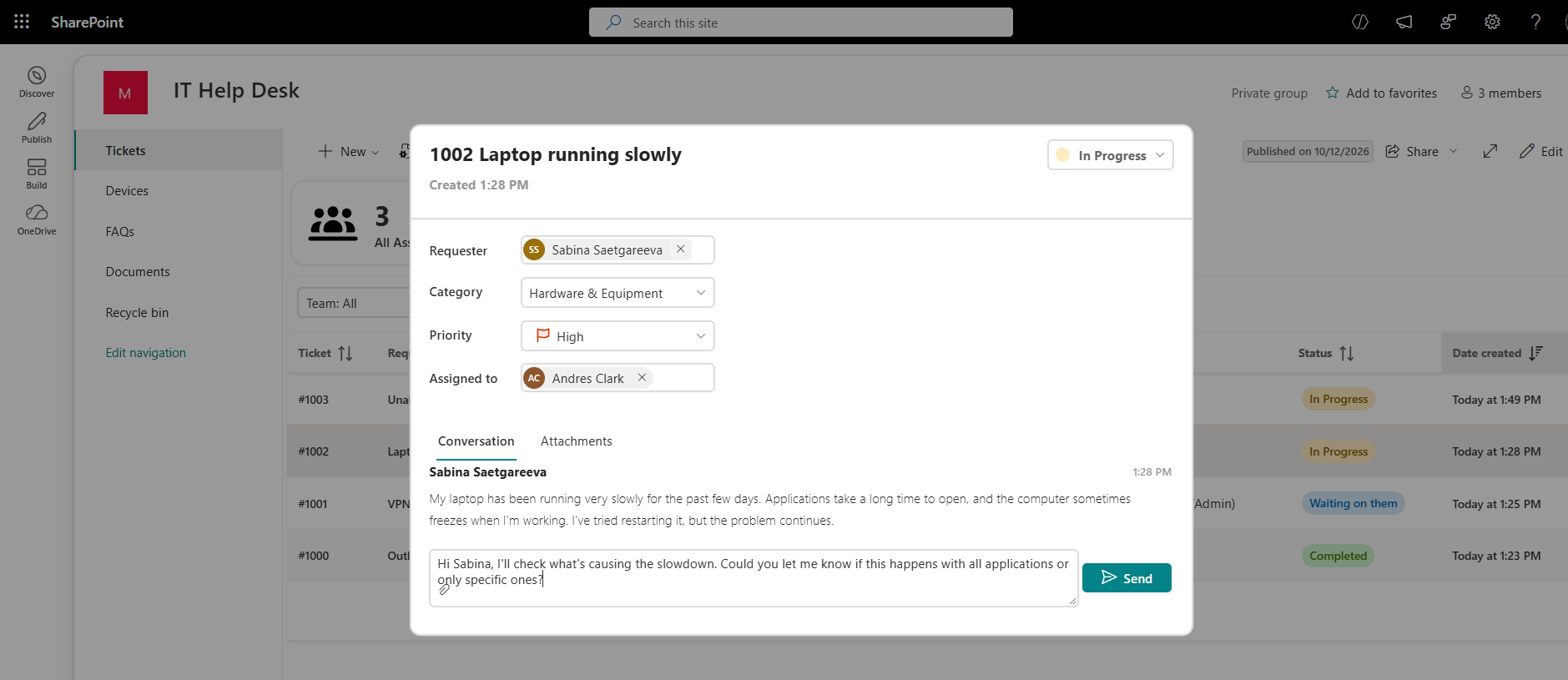
Support teams can assign tickets, update priorities and statuses, and respond to employees.
Help Employees Find Answers Faster
Help employees resolve common issues before submitting a ticket with built-in search, FAQs, and self-help resources organized by category.
Looking to build a searchable help center? Explore our SharePoint Knowledge Base Template.
Why use Origami instead of building a SharePoint ticketing system from scratch?
Microsoft's out-of-the-box SharePoint IT Help Desk template includes a predesigned site, ticket tracking with Microsoft Lists, and helpful resources. But creating a complete ticketing experience with private employee requests, two-way conversations, notifications, and support team dashboards requires additional configuration or development.
Origami provides these capabilities through ready-made SPFx web parts. Employees can submit and track their own tickets, while support teams can assign requests, manage priorities, and respond directly in SharePoint.
No Power Apps, Power Automate, or custom coding required.
Frequently Asked Questions
Does SharePoint have a built-in help desk ticketing system?
Do I need Power Apps or Power Automate to use this template?
Can employees view or modify other people's tickets?
Can I customize ticket categories?
Can multiple support teams use the same SharePoint ticketing system?
Where is the ticket data stored?
Is this a working SharePoint ticketing system or just a visual template?
How do I get this template?
This SharePoint intranet homepage template is part of Origami, a SharePoint intranet solution for Microsoft 365 and SharePoint Online featuring professionally designed templates and 40+ SharePoint web parts for employee portals, HR sites, and communication hubs.
Built using SharePoint Framework (SPFx), Origami takes minutes to install directly inside SharePoint Online with no external hosting required.